

In our post on field automation with AI Automators we generated descriptions, introductions and alt text from a button in the edit form. Each of those automators does the same thing under the hood: render a prompt, send it to a provider's chat endpoint, and store what comes back. That works beautifully when the answer is already contained in the content being edited.
It does not work when the answer lives somewhere else on the site. "Which other articles are related to this one?" is not a question a single chat call can answer, because the model has never seen the rest of your content. That question needs retrieval, and retrieval needs tools, and tools mean agents.
This post introduces the module we built to close that gap.
The goal
The user story: as a content editor, I want the best similar content to be shown for the current page, chosen by something that has actually read the site rather than guessed from the title.
Concretely, we want a Similar Content field on an article that fills itself with real links to real nodes, selected by semantic similarity against the same vector index that powers our search chatbot, with the AI making the final call on which matches are worth showing.
What is this module?
AI Automators Agent adds a new automator type, LLM: AI Agent (llm_agent). Instead of calling a provider directly, it hands the automator's rendered prompt to a configured AI Agent and stores whatever that agent's reasoning and tool-calling loop returns.
Out of the box, the two systems never meet. AI Automators plugins resolve an ai_provider setting and call chat(). AI Agents are a different kind of thing: a config entity with a system prompt, tools, a loop limit and optional structured output, run through an agentic loop. There was no bridge. This module is that bridge, implemented as a base class plus a deriver so it registers one plugin per supported field type (string, string_long, text, tect_long), exactly the way the built-in Llm* rules do.
Importantly, it changes nothing in either contrib module. It is a single additive plugin, safe to enable alongside normal AI Automators and AI Agents usage. Everything an agent can already do, including multi-step tool use and retrieval-augmented search, becomes available to any field automator.
Where to start
You need three things installed: AI with its AI Automators submodule, AI Agents (which brings in Modeler API), and then:
composer require 'drupal/ai_automators_agent:^1.0@beta'
drush en ai_automators_agent
Before touching the field, configure the agent at /admin/config/ai/agents. For our use case, that means an agent with the AI Search RAG tool enabled and a system prompt telling it to find content related to whatever it is given. Leave the agent's provider on "use default" unless you want to pin a specific model, since the agent's own configuration governs how it runs.
How to set it up
Adding it is like adding any other automator. On the Similar Content field of our Article type, enable the automator and choose LLM: AI Agent as the type:
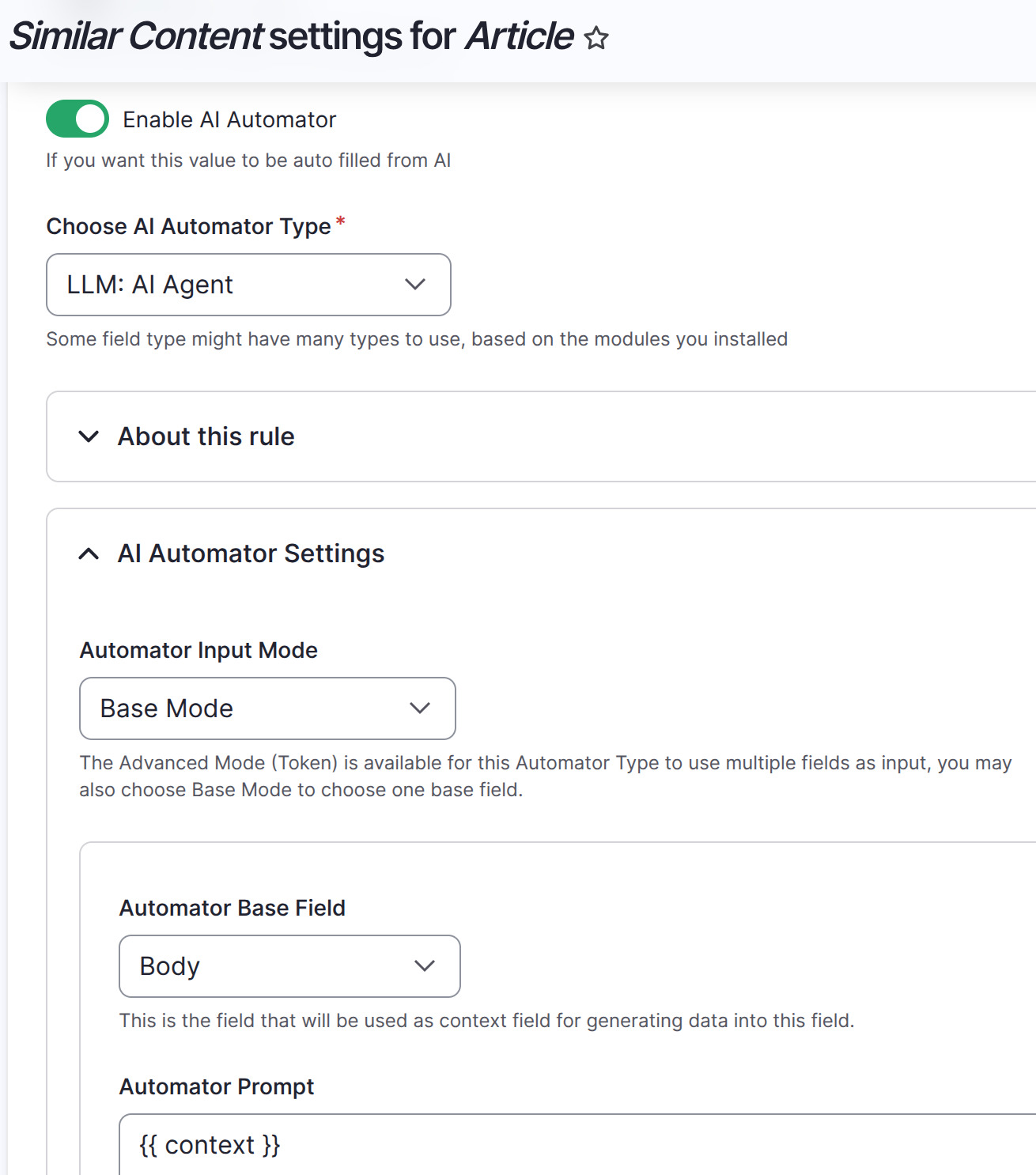
The rest of the form is familiar: an input mode, a base field, and a prompt. Here we use Base Mode with Body as the base field, so the article's own text is what gets handed to the agent as {{ context }}. Under advanced settings, the usual AI Provider and Model pickers are replaced by a single AI Agent picker, because the agent decides that for itself. On formatted text fields you also get a text format picker, the same as the built-in text rules.
Two behaviours are worth knowing because they differ from provider-calling automators. There is no provider or model selection on the automator, by design: the agent's own provider configuration always wins, falling back to the site's chat_with_tools default when the agent does not pin one. And automator-level guardrails do not apply here, so use the agent's own guardrail set instead.
When it runs, the rendered prompt goes to the agent as a single user message. An agent with no tools answers from one provider call. An agent with tools runs its normal loop up to its configured max_loops, and the automator stores whatever it finally answers.
The use case: Similar content
Here is the result in the edit form. The editor clicks Automator Text Suggestion and the field fills with a list of genuinely related articles, each a working link:
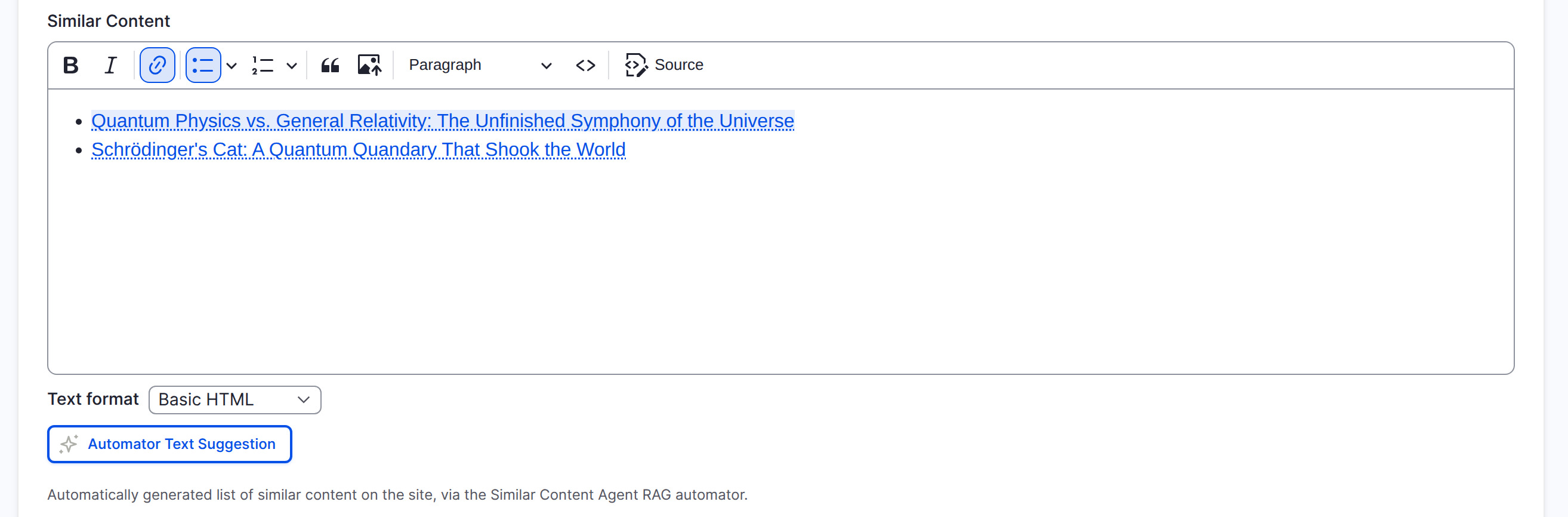
Behind that button, the agent runs its RAG search tool against the site's vector index, evaluates the matches, and returns a formatted list. Nothing here was hardcoded by a view or a taxonomy rule. The agent did the searching and the choosing, and the module turned its answer into a real field value.
This is one example among many. Anything an AI Agent can already do is now available to a field automator, which is why our next post will use this same module to build a content review capability for the Convivial GovCMS site.
How stable is it?
We are in active development. The module is in its beta phase, with 1.0.0-beta3 as the current release, and it is not yet covered by Drupal's security advisory policy. Treat it as a working proof of concept that is ready to try, rather than something to run unattended on a production workflow.
We would genuinely welcome help getting it to stable. Issues, reviews and patches are all useful, and the issue queue is quiet enough that anything you file will get attention.
Upcoming improvements
The obvious low-hanging fruit is supporting field types beyond plain and formatted text. Today the module covers string, string_long and text_long, because those all just store the agent's answer as-is. Entity reference fields are the natural next step for a use case like Similar Content, where storing real node references would beat storing links in markup.
One field type is deliberately excluded: text_with_summary needs a separately generated summary value on top of the main answer, which is a genuinely different behaviour rather than a different storage shape, so it would need its own summary generation step. Structured and JSON output handling is another gap: an agent configured with structured output still runs, but its answer is currently stored as a plain string.
Suggestions are very welcome. If you have a field type or an output shape you need, the issue queue is the place.
Tips and tricks
Share an output template with the model. This module turns the agent's answer into a real field value, so the format of that answer matters enormously. Do not just ask for related content, show the agent exactly what you want back, including the markup. A prompt that ends with a worked example of the expected list is the single highest-value thing you can do here.
Let the automator enforce the field. The automators provided by AI Automators strictly validate values against the target field before saving, so a malformed agent answer is rejected rather than written. That is a real security property: it keeps bad data out of your fields and out of your rendered pages, and it is a good reason to run agent output through an automator rather than writing your own save logic.
Put the guidance in the agent, not the automator. Since automator-level guardrails do not apply, the agent's system prompt and guardrail set are where behaviour and safety live. Keep the automator prompt focused on the task and the output shape.
Mind the loop limit. A tool-using agent can take several turns before answering. Check the agent's max_loops if suggestions are arriving truncated or slow, and remember each loop is a provider call.
Keep governance central. The agent behind the automator is a context consumer like any other, so the rules about voice, formatting and privacy can come from the Context Control Center rather than being pasted into the agent prompt. See Same rules, every suggestion: the Context Control Center and your AI Automators for how that wiring works.
The AI edition and how we use it
The Similar Content automator described here is being trialled for the Convivial for GovCMS AI Edition, alongside the search assistant, the field automators and the global guardrails already in the platform. The same agent-backed pattern is what we will use for editorial review workflows, where an agent needs to look at more than the field in front of it.
Conclusion
Field automation and agents were two good ideas that could not talk to each other. AI Automators Agent is a small plugin that lets them, and the result is fields that can be filled by something that searches, reasons and decides rather than just completes text. Similar Content is one use case. In an upcoming post, we will use the same module to build a content review capability for our Convivial GovCMS site, where the agent reads a draft and tells the editor what needs work before it goes live.