

Every content team has fields that are important but tedious. The summary that powers listings and search results. The introduction that orients the reader. The alt text that makes images accessible. These fields matter enormously to a site's quality, and they are exactly the ones editors skip when time is short.
The AI Automators submodule of the Drupal AI module closes that gap. It lets any field be generated, amended or evaluated by AI, triggered from a button in the edit form, on save, via cron, or as a bulk action. In this post, we set up three automators we ship on every site: a page description, a page introduction, and image alt text. We also share the prompt patterns that make the output dependable rather than merely plausible.
The goal
The user story is deliberately modest. As an editor, I would like an easy way to generate an intro and description for the node I am editing. I want to click a button, get a sensible draft based on the content I just wrote, adjust it if needed, and save. The same goes for alt text on an image I have just uploaded.
Not a content factory, not automated publishing. A well-placed button that removes the most skippable step in the editorial workflow.
Why it matters
Descriptions and introductions are infrastructure. The description feeds listing pages, cards, search results and social shares. The introduction is often what search engines and our own semantic search chatbot lean on most heavily. Alt text is an accessibility obligation, and on government sites, WCAG conformance is not optional.
When these fields are empty or stale, everything downstream degrades. When a button fills them in three seconds from content that already exists, they stop being skipped.
How it works
An automator is a small config entity attached to a field. It combines:
- A rule, matched to the field type, such as llm_simple_string_long for a plain text field or llm_image_alt_text for an image's alt property.
- A prompt, in base mode (one source field) or advanced token mode, where the prompt is a template with access to the site's token tree, including [node:title] and even [node:render:full] for the whole rendered page.
- A worker, which decides when it runs: a field widget button, entity save, a cron queue, or a bulk action.
- Optionally, a guardrail set evaluated against the automator's input and output, with runs aborted on a stop verdict.
Because automators are plain config entities, they export cleanly and deploy like any other configuration. Here is the heart of our description automator's export, trimmed for readability:
# ai_automators.ai_automator.node.article.field_description.default.yml
id: node.article.field_description.default
label: 'Description Default'
rule: llm_simple_string_long
input_mode: token
worker_type: field_widget_actions
entity_type: node
bundle: article
field_name: field_description
edit_mode: false
token: |-
  You are an expert content editor for a government website.
  Write a concise, factual description of the page titled
  "[node:title]" ... Page content: [node:render:full]
guardrail_set_id: null
Where to start
Install the AI module with a configured provider, plus the Token module for token-based prompts. Field UI needs to be enabled while you configure automators, and can be uninstalled afterwards on hardened production sites. Then visit the field's settings form, where a new "Enable AI Automator" toggle appears.
Two contrib recipes are worth studying before writing your own prompts, since they encode good practice for the two big use cases: AI Image Classification for media, and the AI SEO Optimizer for content fields. The prompts shown below are borrowed from and adapted out of these recipes.
Setting it up: the description field
In the description field of our Article type, we enable the automator, choose the LLM: Text (simple) rule, and switch to Advanced Mode (Token) so the prompt can see the full rendered page rather than a single source field:
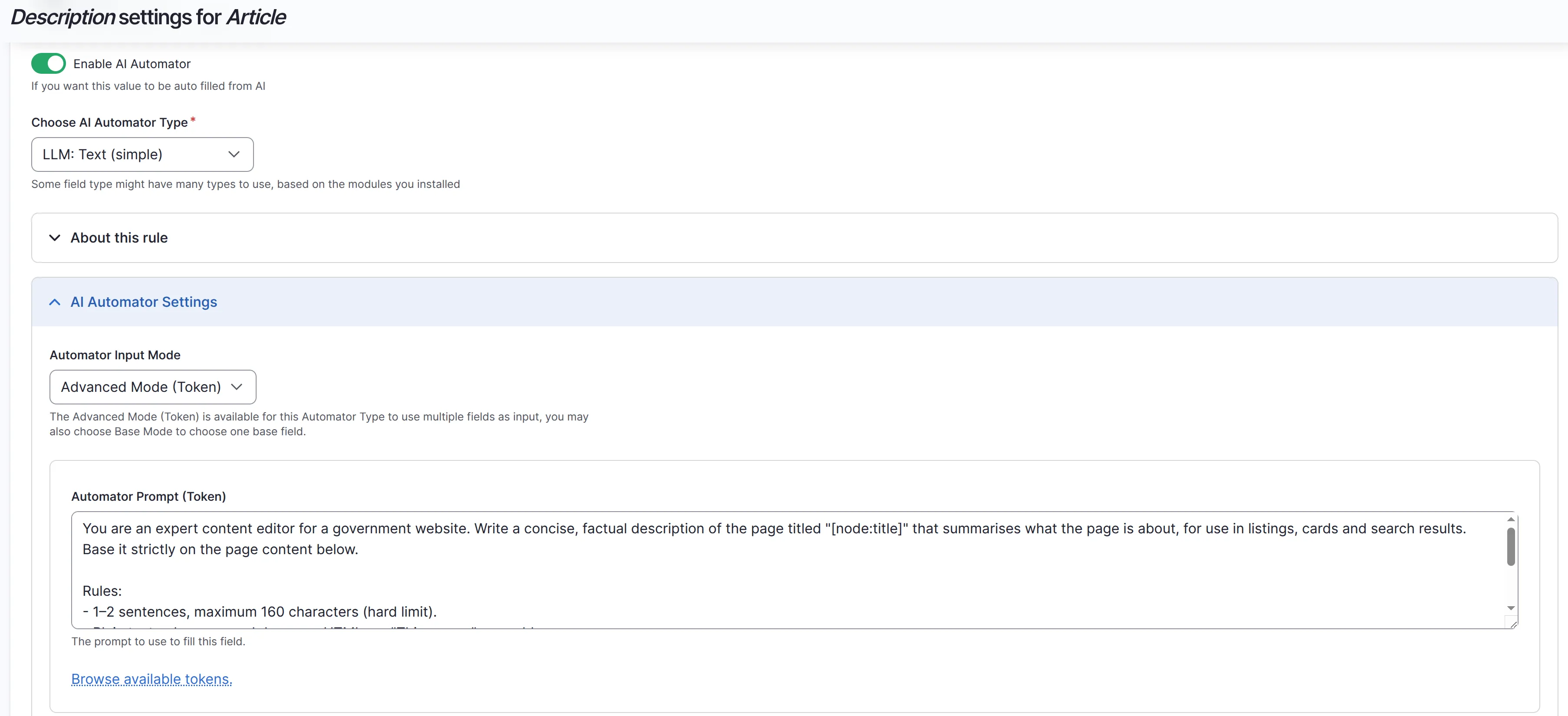
The prompt is short but strict:
You are an expert content editor for a government website. Write a
concise, factual description of the page titled "[node:title]" that
summarises what the page is about, for use in listings, cards and
search results. Base it strictly on the page content below.

Rules:
- 1-2 sentences, maximum 160 characters (hard limit).
- Plain text only, no markdown, no HTML, no "This page..." preamble.
- Neutral, informative tone.

Page content:
[node:render:full]
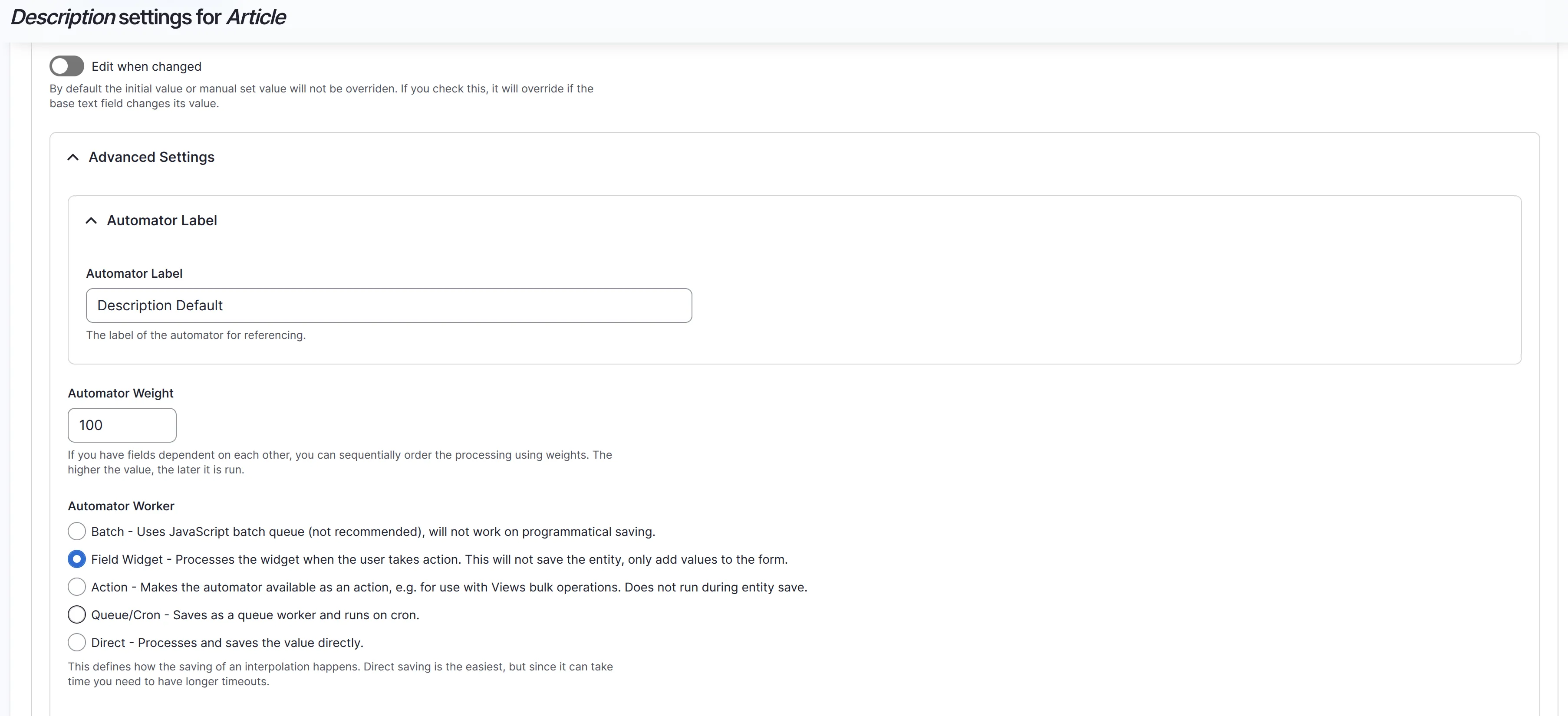
Under Advanced Settings, we give the automator a label, a weight (automators on the same entity run in weight order, so dependent fields can be sequenced), and most importantly the worker. We choose Field Widget, which renders a button in the edit form and only adds the value to the form without saving the entity, keeping the editor in charge:
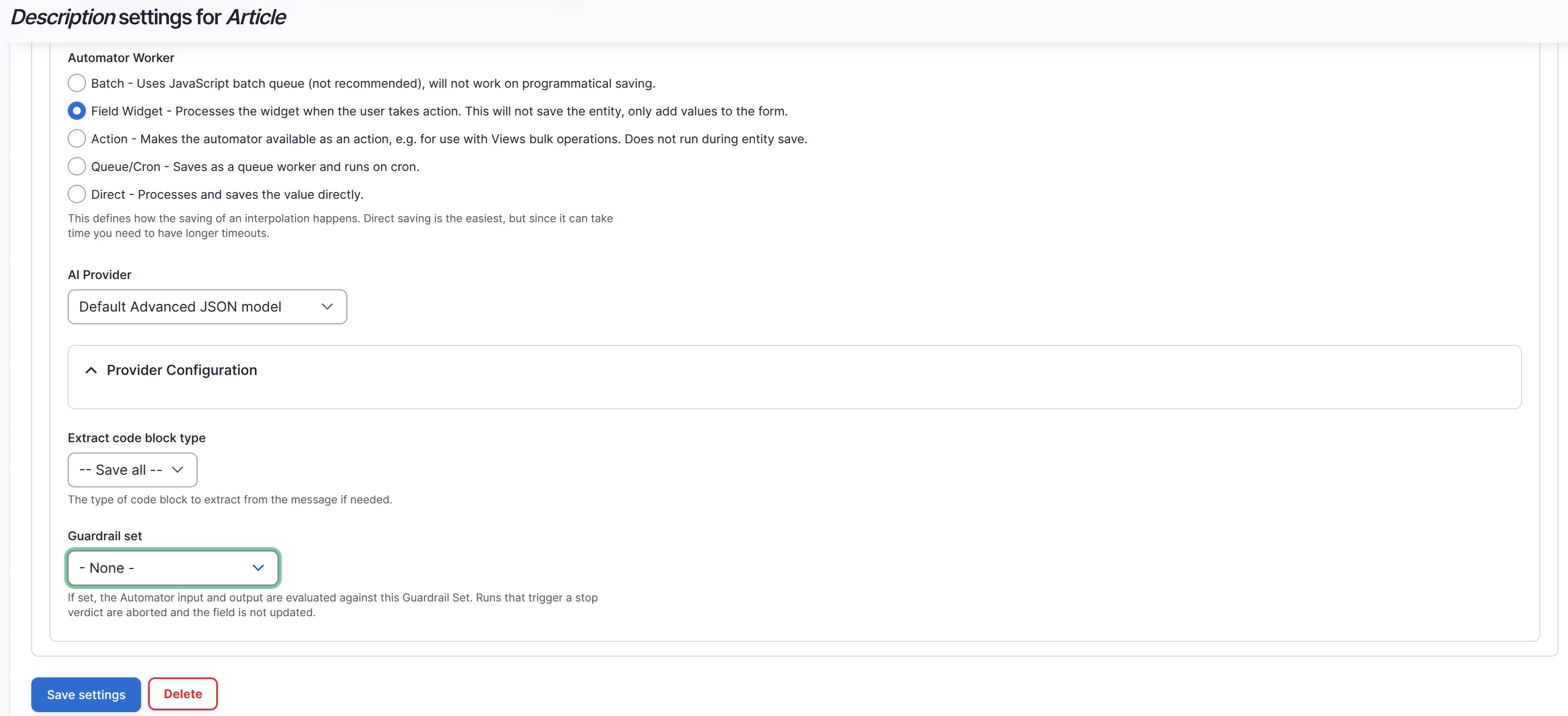
Finally, we pick the AI provider and note the Guardrail set option at the bottom. This is the same Guardrails system we use for the chatbot, applied to automator runs: input and output are evaluated against the set, and a stop verdict aborts the run and leaves the field untouched:
The introduction field is configured identically, with a shorter prompt asking for an engaging introduction that orients the reader, again grounded in [node:render:full].
The use case: alt text on media images
The second user story: as an editor, I would like an easy way to generate alt text for the image I just uploaded. On the media image field, we choose the LLM: Image Alt Text rule, which sends the image itself to a vision-capable model:
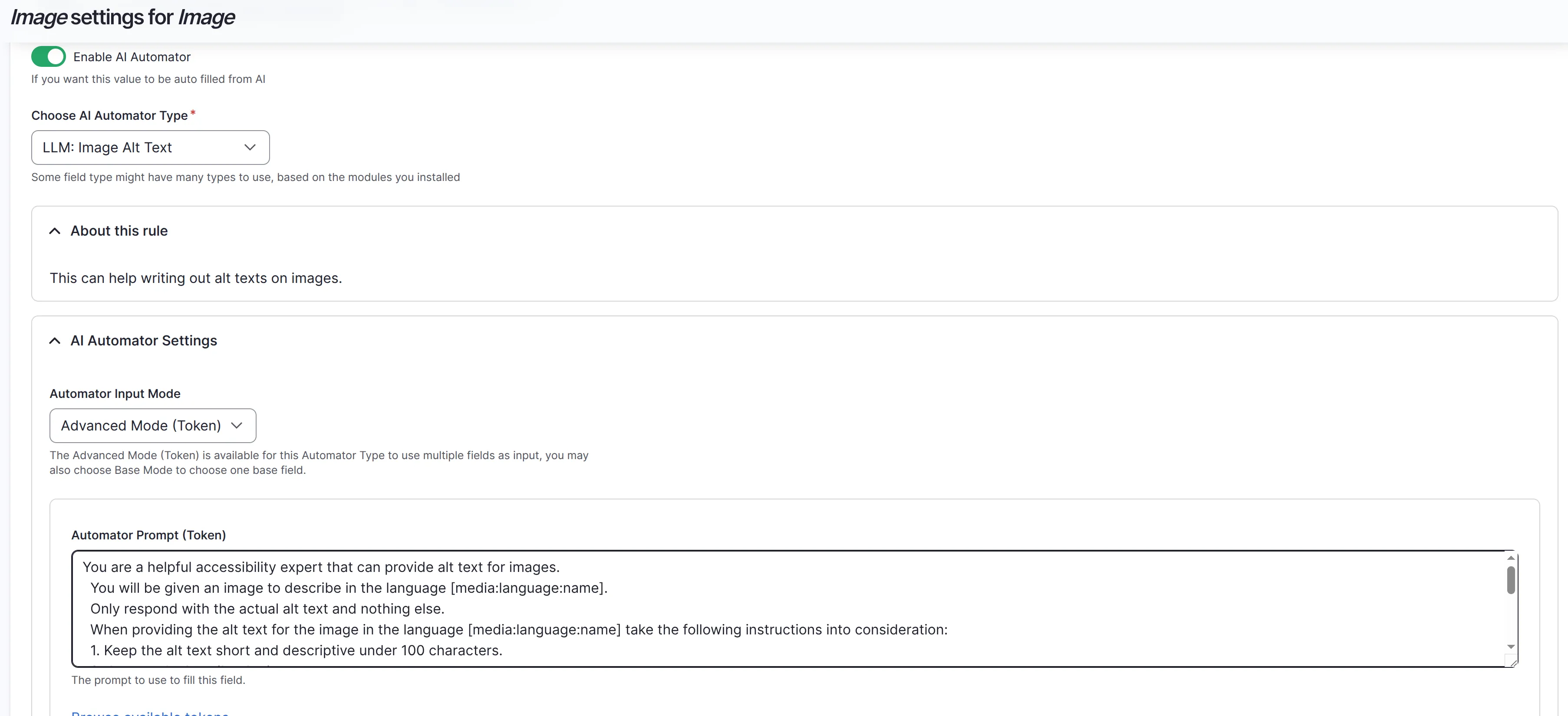
The prompt treats the model as an accessibility expert and encodes the rules that matter, adapted from the image classification recipe: under 100 characters, describe accurately, consider context, no "image of" prefixes, no keyword stuffing, identify logos and graphics as such, and respond with the alt text only. One production detail from our config: the image is passed through a dedicated scale_for_ai_vision image style, so we are not shipping full-resolution originals to the vision model on every click.
How stable are the modules?
AI Automators has been part of the AI module since 1.0, and the core workflow is settled. The current commit log shows steady investment rather than churn. A field widget action base class with a text plugin has just landed (#3586602), formalising the widget button pattern we use here. Rich-text image description support was added to Automators (#3586478). Prompt editing keeps improving, with the MDX editor gaining YAML code block support and a fix for parsing Drupal tokens in prompts. And a form serialization bug affecting the guardrail subform on Drupal 11.3 and 11.4 was fixed promptly (#3586620), which is reassuring given how much we lean on that integration.
Improvement suggestions
Two things would take Automators from good to great. First, direct use of AI agents in automator entities: today an automator wraps a single prompt and rule, and letting it delegate to a configured agent would unlock multi-step generation (research the topic, then write, then check length) without custom plugins. Second, editor experience polish: the widget button works, but progress feedback, an easy compare-and-undo of the previous value, and clearer error surfacing when a guardrail aborts a run would make the feature feel finished for non-technical editors. The recent hiding of field connections until a workflow is selected shows UX is getting attention, and we would love to see it continue in this direction.
Tips and tricks
Structure the prompt, state the rules. The difference between a usable automator and a nuisance is almost entirely prompt discipline. Give the model a role, then a numbered or bulleted list of hard rules: length limits, format constraints, forbidden phrases, tone. Vague prompts produce plausible fluff; rule-driven prompts produce drafts editors accept.
Ground in the render, not the fields. [node:render:full] captures what the page actually says, including paragraphs and referenced content that individual field tokens miss.
State the output contract. "Plain text only", "respond with the alt text and nothing else", "no preamble". Field values are not chat, and the prompt must say so, or you will find "Certainly! Here is your description:" in your database.
Keep the editor in the loop. Prefer the Field Widget worker for editorial fields. Reserve Queue/Cron and bulk actions for backfilling existing content, and consider leaving "Edit when changed" off so manual values are never silently overwritten.
Put a guardrail set on generation. The same PII set that protects our chatbot runs on automator input and output. Content sent to a provider deserves the same protection regardless of which feature sends it.
The AI edition and how we use it
The three automators in this post ship preconfigured in the Convivial GovCMS - AI edition as Automated Node: Intro and Description, and Automated Media Image: Alt. They arrive wired to the platform's default providers and covered by the global guardrails, so a new site has one-click intros, descriptions and alt text from the first login, in the same way it starts with a customised chatbot and semantic search already in place.
In closing
AI Automators is the least glamorous member of the Drupal AI family and possibly the most immediately useful. It does not chat, it does not search, it just fills in the fields nobody wants to write, from content that already exists, with an editor pressing the button and reviewing the result. Start with description, introduction and alt text, write prompts with rules rather than vibes, keep a guardrail set on every run, and your listings, search results and accessibility posture all improve on the first day.