

In Site-wide governance for AI answers: the Context Control Center and your chatbot, we moved our voice, accessibility and privacy rules out of individual prompts and into the Context Control Center, where agents pick them up automatically. That fixed the chatbot. It left an obvious gap.
The AI Automators behind our "Generate description", "Generate introduction" and "Generate alt text" buttons were still carrying their own copies of the same guidance, because context injection was an agent-only path. This post is how that gap closed, and how to wire it up on your own site.
The goal
The user story: as a content editor, I want the suggestions those buttons produce to follow site-wide governance, the same way chatbot answers do. When the platform's voice standard changes, I should not have to hunt through two dozen automator prompts to update it.
Put differently: site content should rely on context items to hold the tone and the standard in place. One source of truth, two very different consumers.
What is the Context Control Center, briefly
The Context Control Center (CCC), provided by the AI Context module, stores AI governance as content entities called context items. Each item is a piece of Markdown guidance with a label, a purpose line, a scope and a moderation state. A selector matches published items to the current request by scope, ranks them, fits them within a token budget, and pushes the compiled result into the consumer's system prompt.
On our Convivial Gov sites, that means three global items (Voice, Language & Terminology; Accessibility & Formatting; Privacy, Safety & Compliance) plus a media-only item scoped to the working_with_media use case. The previous post covers authoring and deployment in detail.
Where to start: consumers
Our first attempt at reaching automators was a Drupal token that pulled compiled context into the prompt, which we proposed upstream as a first-class [ai_context:*] token (work item 3586417).
The module went further and better. Beta 5 introduced the concept of consumers: anything that can receive context. An agent is a consumer. An automator is a consumer. Other integrations can ship their own consumer type. Each live instance gets its own configuration row, and the same ranked, budgeted context pipeline serves them all. No token, no custom prompt plumbing.
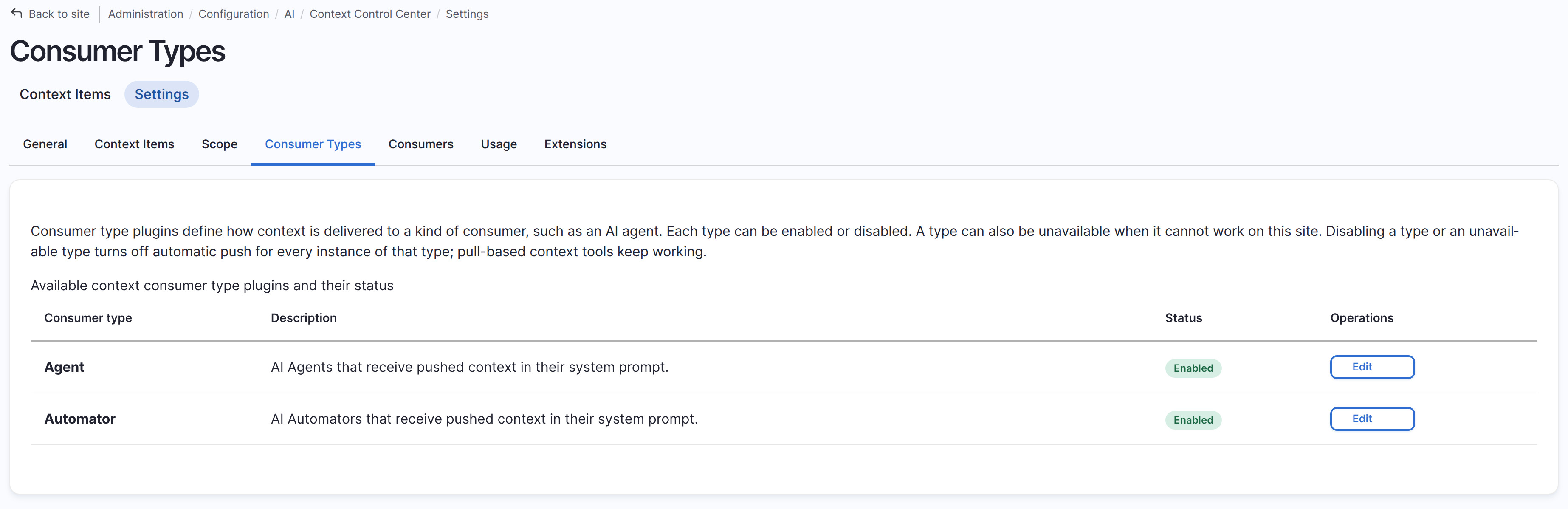
Consumer types are plugins, and CCC ships two: agent and automator. You can see them and turn either off site-wide on the Consumer Types listing:
The Consumers listing is where the two worlds meet. Our search agent and search assistant appear alongside the article description and introduction automators, each with its type, its automatic push state, and a summary of what it receives:
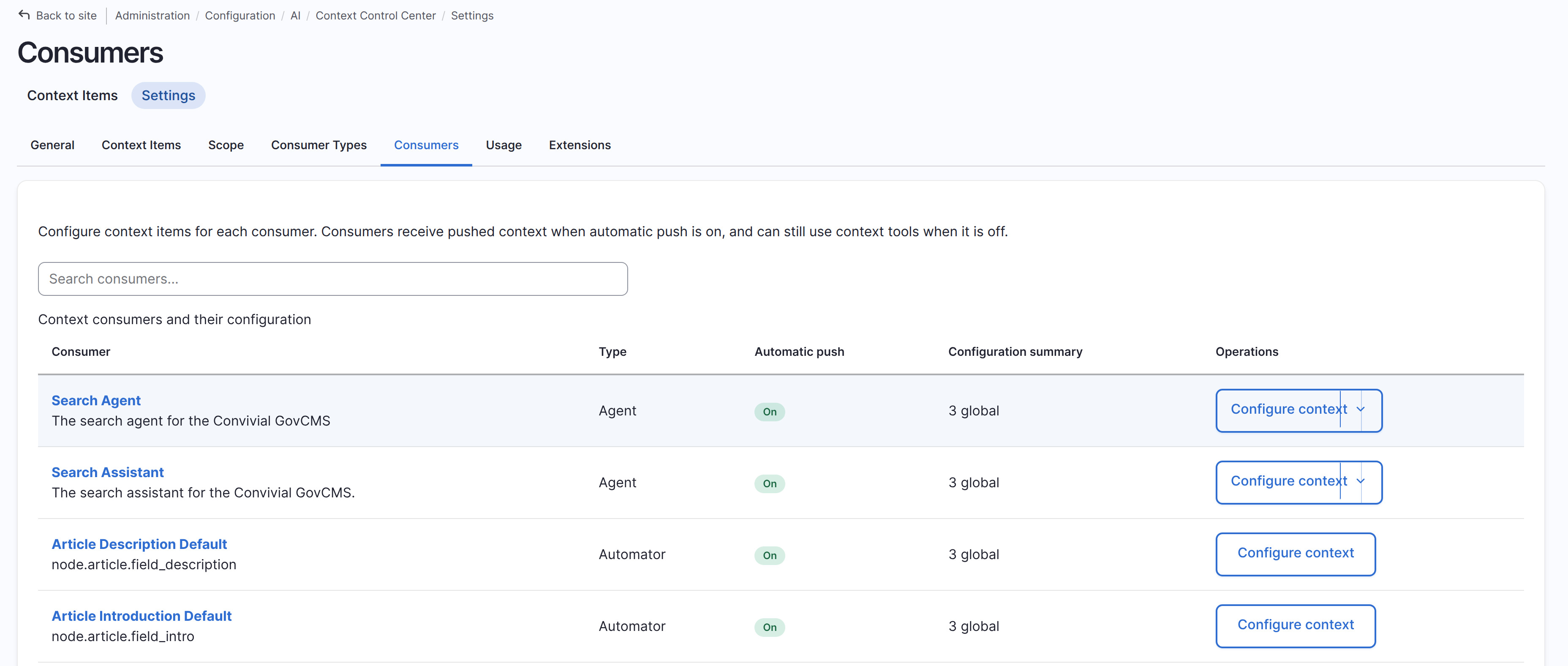
Note that the two automator rows carry the same "3 global" summary as the agents. That is the whole point.
How to set it up
Go to admin/config/ai/context/settings/consumers, find the automator, and click Configure context. Three things matter on that form.
Turn on automatic push. Unlike agents, automators default to push off, so this is the deliberate opt-in step. With it on, ranked context is pushed into the automator's system prompt within the configured limits.
Check the selection mode and subscriptions. New non-agent consumers default to Minimal, which delivers global items, always-include items, specific entity matches and strict scope subscription matches. For text automators inheriting three global items, Minimal is exactly right. If you want an automator to also pick up a narrower item, subscribe it to that scope: ticking Working with Media on the alt text automator is how our media item reaches it and nothing else.
Watch the budget. The form estimates what this consumer could spend before you save:
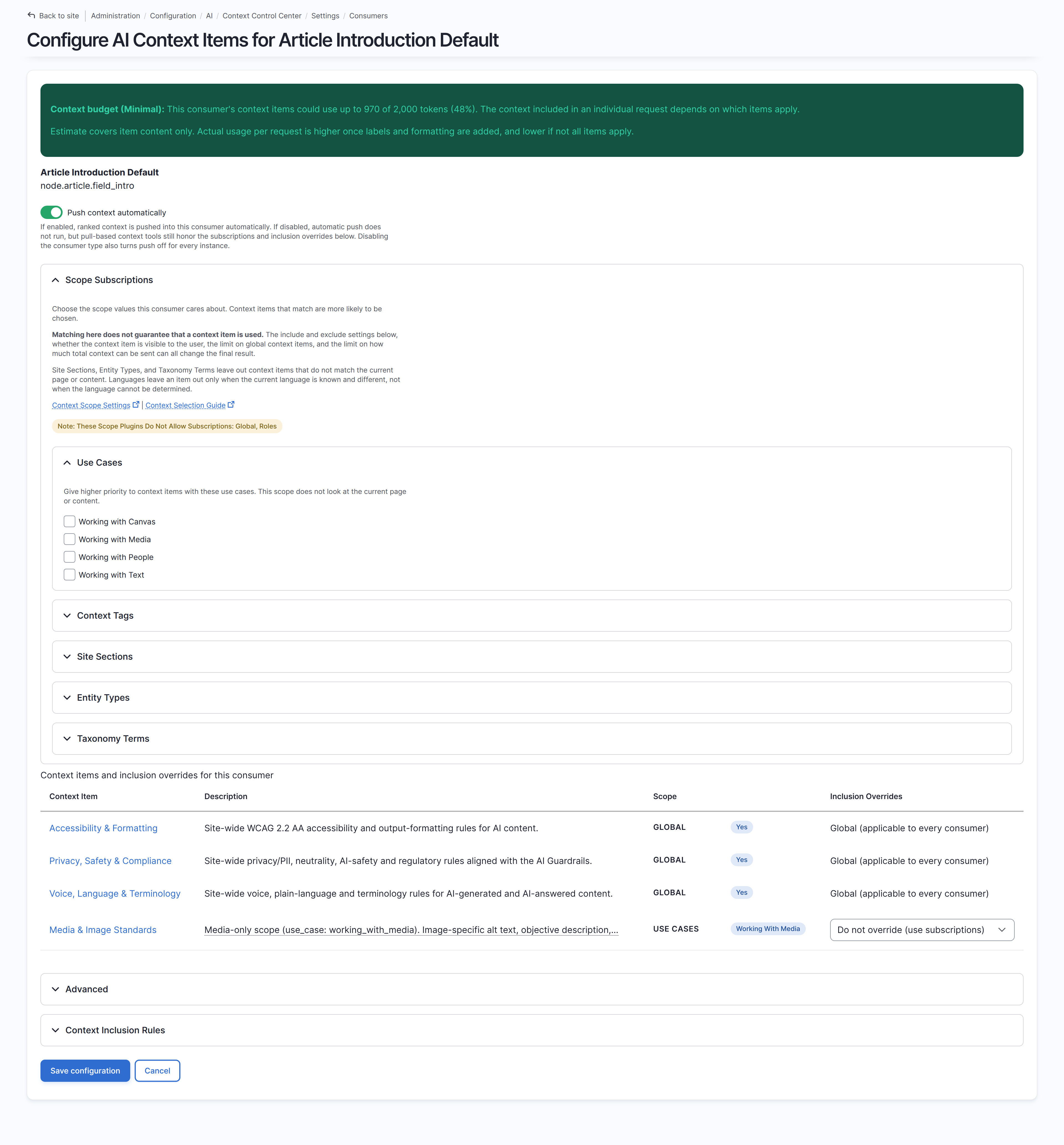
At the bottom, the same inclusion override table you get for agents: the three global items apply to every consumer, while the media item sits at "Do not override (use subscriptions)" so it stays out of a text field's prompt.
Because ai_context.consumers is configuration, the result exports and deploys like anything else:
bash
drush config:exportyaml
# ai_context.consumers.yml (trimmed)

consumers:

  automator:node.article.field_intro.default:

    push_enabled: true

    selection_mode: minimal

    subscriptions: {  }

    always_include: {  }

    never_include: {  }
Two portability notes worth knowing before you promote this to production. Always-include and never-include lists are stored as context item UUIDs, so they survive export and import cleanly. Subscriptions to context tags or taxonomy terms store term IDs, which only match if those terms share IDs across environments, so prefer use case scopes for portable governance.
Our use case
We enabled it first on the two text automators: article description and article introduction. Both now inherit the three global items, and both prompts lost the duplicated guidance they were carrying. What remains in each automator prompt is the task and the output contract, for example, the 160-character hard limit on a description, plus one line noting that the task's output contract overrides the shared formatting guidance where they disagree.
The alt text automator on media images is the interesting one, because it subscribes to Working with Media and therefore receives the three globals plus the media item, with its alt text conventions, objective description rules and licensing guidance: same mechanism, different scope, no code.
The editor experience does not change at all. They click the same button, but the suggestion now arrives in the platform voice, at the platform reading level, holding the platform privacy line.
How stable is the consumer API?
Beta 5 is recent, so treat this as new but not raw. The underlying API is well considered: consumer types are attribute plugins with a documented contract, push runs behind three explicit gates (the instance flag, the type kill switch, and an availability check), and the consumer API documentation is unusually candid about boundaries, including which types should live in CCC and which belong to the consuming project.
One implementation detail to be aware of: matching an automator request requires an ai_automator:id:{id} request tag that AI core does not emit yet, so CCC carries a temporary internal subscriber that infers it when the entity type, bundle and field identify a single automator, or when a widget click maps to one. It works, including skipping the other automators on a field when you click one button, but direct and cron runs on a shared field decline rather than guessing. Expect that shim to disappear once core ships the tag.
The UI is where the newness shows, and the maintainers know it: work item 3586486 tracks consumer UI improvements. Meanwhile, the 1.0 milestone is due by the end of this month, so the API you build against now will soon be covered by a stability promise.
If you are writing your own integration rather than using the shipped types, the pull side is a one-liner:
php
$context = \Drupal::service('ai_context.request_factory')

  ->getRenderedContext(['use_case' => ['working_with_text']], 2000);
Tips and tricks
Write the items well, because they do the heavy lifting. Everything from the previous post applies: imperative, testable rules rather than aspirations, one concern per item, non-negotiables first since the renderer truncates from the tail, and editor notes in the description field where the model never sees them.
Trim the automator prompt after enabling push. Governance arriving twice wastes budget and invites drift. Leave the task, the output contract and any genuine per-field constraint, and delete the rest.
Cap multi-value fields. An automator on a multi-value field runs one call per delta, so context is selected and billed each time. The per-consumer token limit is the lever.
Scope instead of globalising. A fourth global item costs every consumer on every request. A use case scope costs only the consumers that subscribe.
Keep guardrails as the backstop. Context is the soft layer that tells the model how to behave. Guardrails are the hard layer that stops it when it does not, and automators accept a guardrail set on every run.
Turn on debug logging while wiring this up. It is the quickest way to tell a declined request from a push-disabled one from a successful push, which is otherwise invisible.
The AI edition and how we use it
In the Convivial for GovCMS AI Edition, the context items ship as default content and the consumer configuration ships as config, so a new site starts with the search assistant and the field automators reading from the same governance on day one. An editor who tightens the voice item at /admin/config/ai/context/items changes the chatbot and every generate button in the same publish, without a deployment.
Conclusion
Governance is only worth writing once. The Context Control Center's consumer model is what makes that literally true: the same items, the same ranking, the same token budget, delivered to an agent answering a visitor's question and to a button helping an editor write a summary. Enable push on your automators, trim the duplicated guidance out of their prompts, scope the specialised items to the consumers that need them, and your AI features will finally sound like one site rather than a dozen separately tuned prompts.