

In our previous post we built a semantic search chatbot with the Drupal AI module. Out of the box, it works well, but a production chatbot rarely ships with defaults. The placeholder text should match your brand voice, the widget needs your design tokens, and sooner or later someone asks the obvious question: are visitors actually happy with the answers?
The AI Chatbot submodule renders its chat with the Deep Chat web component, and it exposes a small, well-designed set of hooks for exactly this kind of customisation. In this post, we walk through those hooks, build a thumbs up / thumbs down feedback widget as a worked example, and share what we have learned about where customisation should happen (in the prompt) and where it should not (in response post-processing).
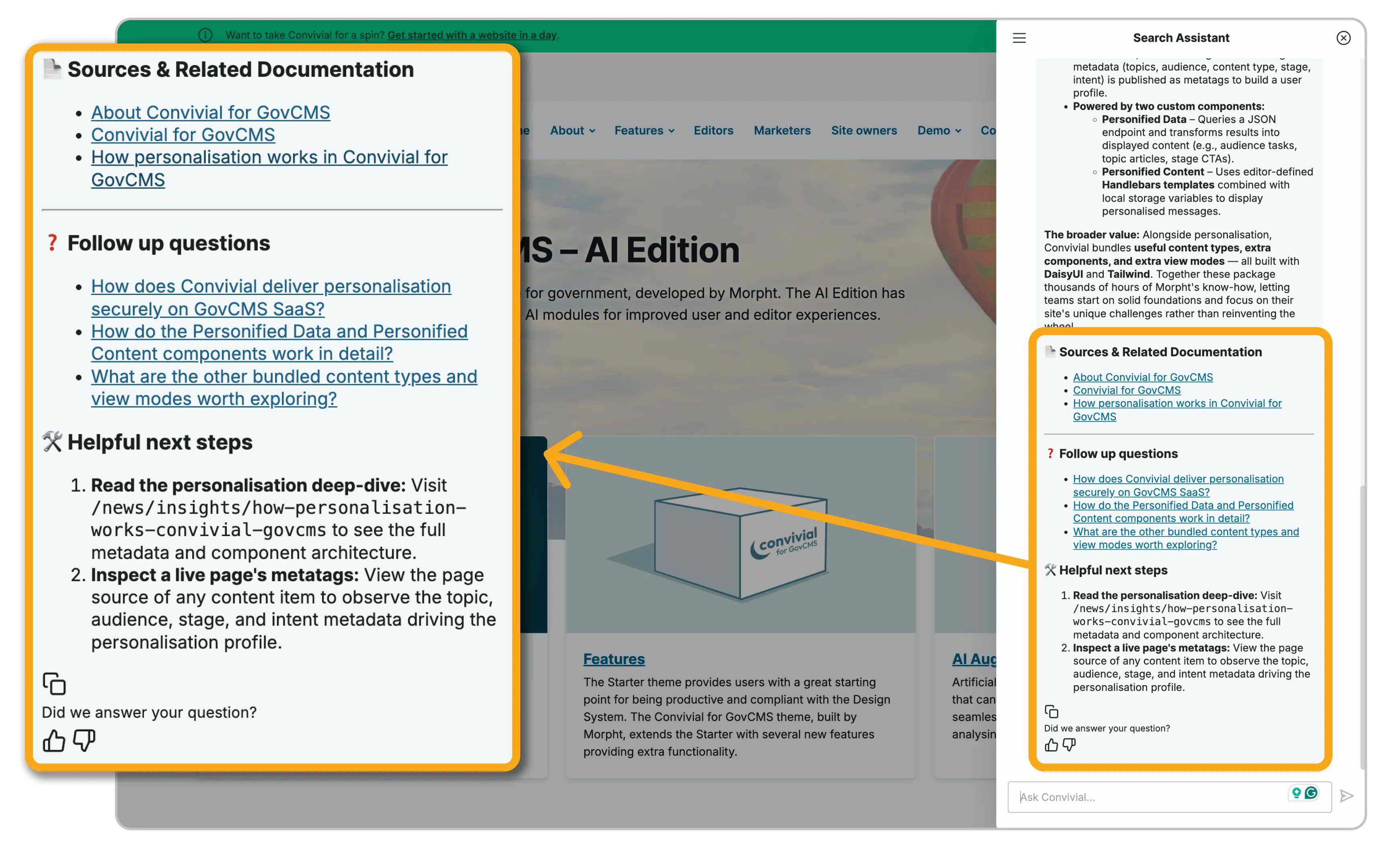
The goal
We want three things from the chatbot widget:
- It should look and speak like the site it lives on, not like a demo.
- Every assistant message should carry a "Did we answer your question?" rating so we can measure answer quality with real user signal.
- The customisations should survive module updates, which means using the supported extension points rather than patching the module or poking at its markup.
Where to start
The extension points are documented in ai_chatbot.api.php inside the AI module, and the official chatbot customisation docs cover the basics. Deep Chat's own design examples are worth a browse too, since most visual options are just element attributes that Drupal passes through.
One architectural fact shapes everything else: Deep Chat renders its messages inside an open shadow DOM. Page CSS cannot reach inside it, and events are retargeted on their way out. The hooks and the component's public JavaScript API are therefore not just the polite way in, they are the only reliable way in.
We implement the hooks as object-oriented #[Hook] methods on an autowired service, the modern Drupal 11 pattern:
yaml:
# my_deepchat.services.yml
services:
  Drupal\my_deepchat\Hook\DeepchatHooks:
    class: Drupal\my_deepchat\Hook\DeepchatHooks
    autowire: true
Setting it up
1. Widget settings: hook_deepchat_settings
This hook runs before the chat attributes are JSON-encoded into the <deep-chat> element, so nested values can be set as plain PHP arrays. It is the place for branding: placeholder text, styling attributes, or a CSS class that lets your theme target this chatbot specifically.
php:
<?php

declare(strict_types=1);

namespace Drupal\my_deepchat\Hook;

use Drupal\Core\Hook\Attribute\Hook;

/**
 * Deep Chat customisations for the AI Chatbot widget.
 */
class DeepchatHooks {

  #[Hook('deepchat_settings')]
  public function deepchatSettings(array &$settings): void {
    // Brand the input placeholder.
    $settings['textInput']['placeholder']['text'] = 'Ask our assistant...';

    // Tag the element so site CSS can target this chatbot without
    // affecting other .deepchat-element instances.
    $settings['attributes']['class'][] = 'my-deepchat';
  }

}
2. Message buttons: hook_deepchat_buttons_alter
After each assistant message, the module renders a button group (this is where its copy button lives). The alter hook lets us append our own. One constraint to know up front: buttons are rendered as <img> elements, images only, no text. We add two thumbs and tag them with classes the JavaScript will use:
php:
 #[Hook('deepchat_buttons_alter')]
  public function deepchatButtonsAlter(array &$buttons): void {
    $path = \Drupal::service('extension.list.module')
      ->getPath('my_deepchat');

    foreach (['up', 'down'] as $rating) {
      $buttons['feedback_' . $rating] = [
        '#theme' => 'image',
        '#uri' => '/' . $path . '/assets/thumb-' . $rating . '.svg',
        '#attributes' => [
          'class' => [
            'chat-button',
            'my-feedback',
            'my-feedback--' . $rating,
          ],
          'alt' => $rating === 'up'
            ? t('Yes, this answered my question')
            : t('No, this did not answer my question'),
        ],
      ];
    }
  }
3. Attaching the JavaScript: hook_library_info_alter
The natural instinct is to #attach a library to the block. That fails in an instructive way: the feedback buttons arrive over an AJAX / SSE response from the chatbot's API endpoint, where #attached libraries are lost. The robust approach is to make your library a dependency of the chatbot's own page-level library, so the behaviour is guaranteed to be present whenever the widget is:
php:
 #[Hook('library_info_alter')]
  public function libraryInfoAlter(array &$libraries, string $extension): void {
    if ($extension === 'ai_chatbot' && isset($libraries['deepchat'])) {
      $libraries['deepchat']['dependencies'][] = 'my_deepchat/feedback';
    }
  }
4. The JavaScript: working with the shadow DOM
The AI Chatbot init script dispatches a DrupalDeepchatInitialized event once the widget has rendered, with the chat elements in event.detail.chats. Because our library loads as a dependency of the chatbot library, our listener is registered before that event fires.
For the click handling, we use Deep Chat's public htmlClassUtilities API, the same mechanism the module's own copy button uses. Deep Chat re-reads this object every time a message renders, so the thumbs are wired on all current and future messages, and shadow DOM event retargeting never becomes our problem:
js:
chatEl.htmlClassUtilities = chatEl.htmlClassUtilities || {};
chatEl.htmlClassUtilities['my-feedback'] = {
  events: {
    click: (event) => {
      const button = event.target.closest('.my-feedback');
      const rating = button.classList.contains('my-feedback--up')
        ? 'up' : 'down';

      chatEl.dispatchEvent(new CustomEvent('my-deepchat:feedback', {
        bubbles: true,
        composed: true,
        detail: { rating, button, chat: chatEl },
      }));
    },
  },
};
The one thing the buttons API cannot express is text, so the "Did we answer your question?" label is injected by the JavaScript instead: a MutationObserver on the shadow root watches for new message button groups and inserts the label above each pair of thumbs.
The use case: what feedback unlocks
Note what the click handler does: it dispatches a CustomEvent with bubbles and composed set, so the event escapes the shadow DOM and can be heard anywhere on the page. The module itself deliberately persists nothing. Recording the signal is a listener away, and completely decoupled from the widget:
js:
document.addEventListener('my-deepchat:feedback', (event) => {
  const { rating, assistantId, threadId } = event.detail;

  // Send to analytics, a REST endpoint, or both.
  fetch('/api/chat-feedback', {
    method: 'POST',
    headers: { 'Content-Type': 'application/json' },
    body: JSON.stringify({ rating, assistantId, threadId }),
  });
});
Paired with the assistant and thread IDs (readable from the chat element's connect attribute), the ratings become a quality dashboard: which questions get thumbs down, which content gaps keep appearing, whether a prompt change moved the needle.
The same event-driven pattern covers our other favourite use case: tracking which cited sources users actually click. A listener on the chat element can watch for link activations in responses and push them to analytics, telling you whether the "Sources" section of your prompt is earning its place.
How stable is this?
The chatbot side of the AI module is under active development, and the current commit log tells a story of maturing architecture. A chat processor plugin system landed on 1.x with tests, giving message processing a proper extension point rather than hardcoded behaviour. Markdown handling was rebuilt on league/commonmark with a dedicated HTML-to-Markdown conversion service. Bot avatars can now be token-based without mutating block config. Most significantly, submodules are being split out as standalone contrib modules fetched via Composer, which signals to the project that these components are ready to version independently.
For customisers the practical takeaway is that the hook surface we use here is small and stable, but check ai_chatbot.api.php after each update, and keep an eye on the chat processor plugin system: some customisations that need a hook today may be cleaner as a processor plugin tomorrow.
Improvement suggestions
Working this close to the widget surfaces a few rough edges worth filing or watching in the issue queue. The buttons API accepting only images is the main one: a text or render-array option would remove the need for label injection via MutationObserver. A documented feedback storage API would also help, since answer quality measurement is a need every serious deployment shares. And the deepchat_prepend_message hook would benefit from a worked example in the docs, particularly around escaping, since its output bypasses the response sanitiser and is restricted to the tags in DeepChatApi::$allowedTags.
Tips and tricks
Let the prompt do the heavy lifting. Response structure belongs in the assistant prompt, not in PHP. Our assistant prompt specifies the whole answer format: core answer first for streaming, a sources section with links, follow-up questions, next steps. We once implemented hook_deepchat_prepend_message to bolt those sections onto each answer in code, and removed it. The prompt version is more coherent, easier to tune, and has no escaping pitfalls.
Do not traverse responses; use guardrails. It is tempting to post-process answers in PHP: strip phrases, redact patterns, rewrite links. Resist it. Response filtering is exactly what the Guardrails system is for, with post-generate guardrails that run on every response, a scoring model, and site-wide enforcement via global guardrail sets. Widget hooks are for presentation, and guardrails are for content.
Style inline, or through the component. Shadow DOM means page CSS will not reach injected elements. Style them inline from the JavaScript, inherit the module's existing chat-button sizing where you can, and use Deep Chat's own styling attributes (via hook_deepchat_settings) for everything the component exposes natively.
Guard against double-wiring. Both the init event and Drupal behaviours can fire more than once. Cheap dataset flags on the chat element and on each button group keep handlers and labels from being attached twice.
The AI edition and how we use it
Everything in this post ships as a small module in the Convivial GovCMS - AI edition: the branded widget settings, the feedback thumbs, the label, and the feedback event ready for a site-specific listener. Together with the preconfigured search assistant and the global PII guardrails from the earlier posts in this series, it means a new site starts with a chatbot that is branded, measurable, and safe by default.
In closing
The Deep Chat widget rewards working with the grain. Use the hooks for presentation, the component's public JavaScript API for behaviour, the prompt for response structure, and guardrails for response content. Customisations built that way survive updates, stay out of the module's internals, and leave you with something the defaults cannot give you: a feedback loop telling you whether the chatbot is actually helping.