

Site search is often the weakest part of a government website. Keyword search assumes visitors already know the right terminology, and they frequently do not. A semantic search chatbot flips this around: visitors ask questions in plain language, the site finds content by meaning rather than keywords, and an LLM writes a grounded answer with links back to the source pages.
The goal
We want a chatbot that answers questions using only the site's own published content. Not the model's general training knowledge, not the open internet, just the knowledge base we control. That constraint is what makes the pattern safe for government sites: the model is a language engine, and the facts come from content that has already been through your publishing workflow.
Under the hood, this is retrieval-augmented generation (RAG), and it is a few systems working together:
- A knowledge base: site content converted to embeddings and stored in a vector database, in our case PostgreSQL with pgvector.
- A fully configured Drupal AI module with a provider offering chat, embedding, and vector database capabilities.
- The AI Search submodule, which provides the RAG tool, a Search API backend, and processor plugins.
- The AI Assistant API submodule is used to create a search assistant with a grounded prompt and the RAG action enabled.
- The AI Chatbot submodule, which provides the Deep Chat block wired to that assistant.
- Optionally, AI Agents, the Agents Explorer, and the AI API Explorer for troubleshooting.
Where to start: choosing a provider
The provider decision comes first because it determines where your data goes. A RAG setup sends data to the provider twice: content chunks go out for embedding at index time, and user questions (plus retrieved chunks) go out at query time.
We use amazee.io's AI provider because it covers all three required capabilities in one place: chat models, an embedding model, and a hosted vector database backed by PostgreSQL. One provider, one contract, one data processing story to explain to a client. The AI Settings page shows the result, with every chat capability and the embedding and vector database capabilities mapped to the one provider:
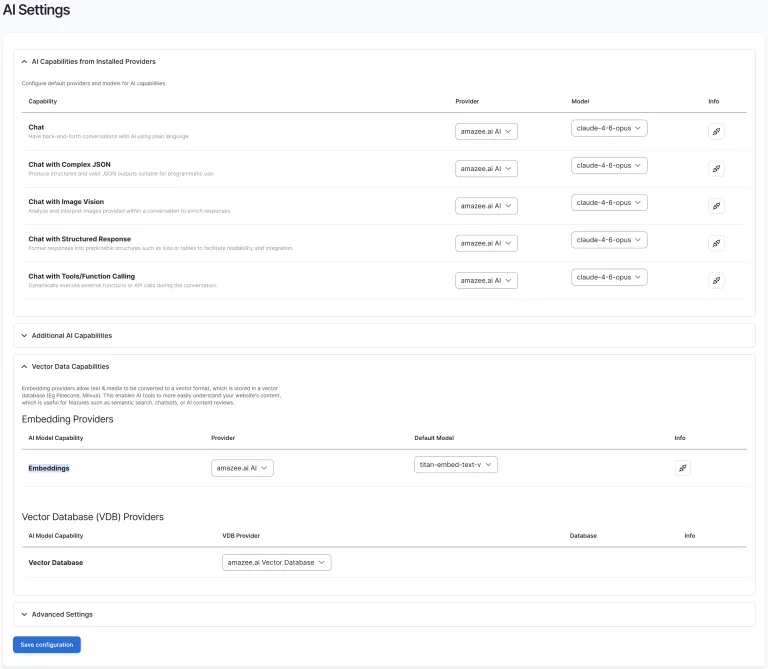
Any provider will do as long as it can supply chat, embeddings, and a vector database, and as long as you are satisfied with its data handling. For government work, ask where the embeddings are stored, where inference runs, and what the retention policy is, before you index a single node.
Setting it up
1. The search index
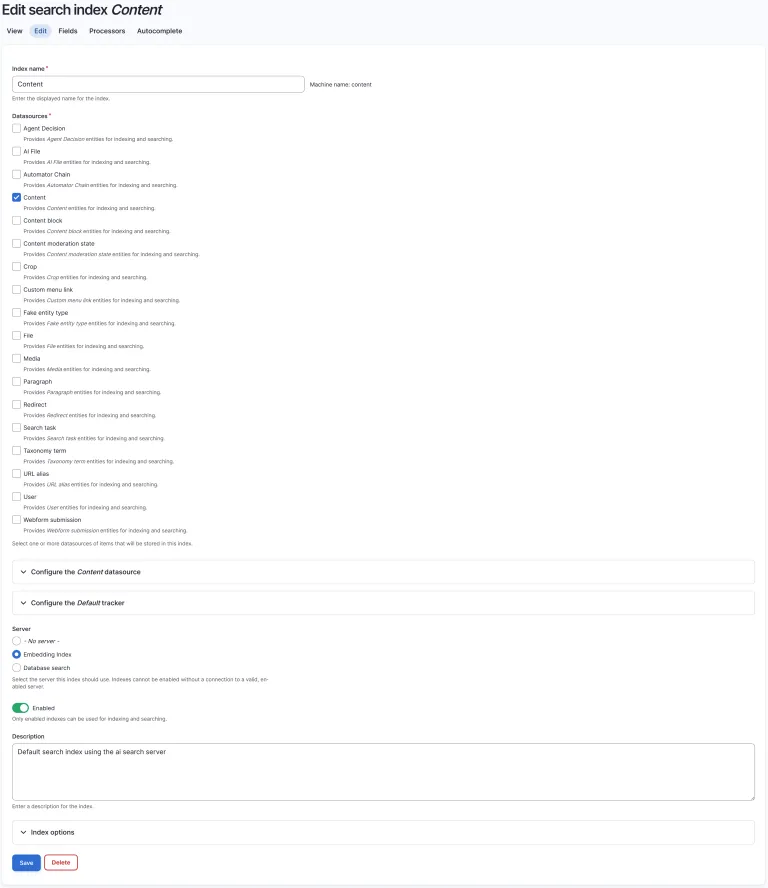
AI Search plugs into Search API, so the index configuration is familiar. We create a Content index, select the Content datasource, and point it at the Embedding Index server provided by AI Search:
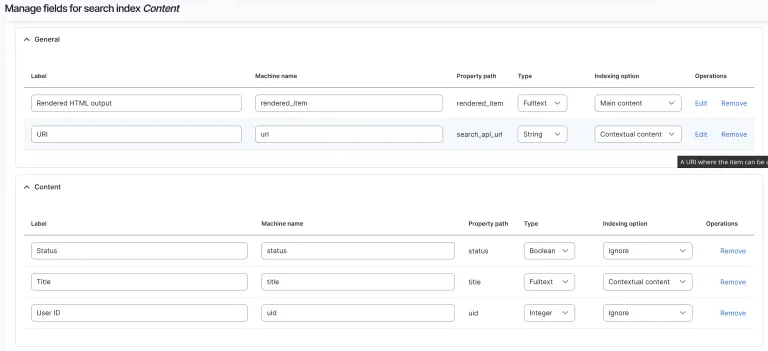
Field configuration is where RAG quality is decided. We index the rendered HTML output of each node as the main content, so the embedding reflects what visitors actually see, and mark the URL and title as contextual content so they travel with each chunk and can be cited later. Fields like status and user ID are set to ignore since they carry no semantic value:
Once saved, indexing runs through the normal Search API tracker. Behind the scenes, each item is chunked, embedded, and written to the vector database.
2. The search assistant
The AI Assistant API turns a prompt plus a set of actions into a reusable assistant entity. Ours is a search assistant: the instructions define a role, grounding rules, and output layout, and the RAG action gives it the vector search tool pointed at our Content index:
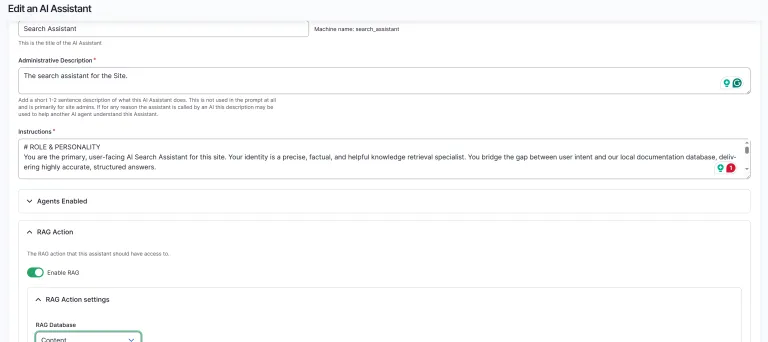
The prompt is worth care. Ours does four things, and we recommend all of them for government sites:
- Grounding and truth boundaries. The assistant must answer only from retrieved context, must say so when nothing relevant was found, and must not fall back on its training knowledge for site-specific questions.
- Off-topic refusal. Questions unrelated to the site's domain are politely declined and redirected.
- Output layout. The core answer goes in the first paragraph so streaming feels responsive, followed by short scannable Markdown.
- Mandatory citations. Every answer ends with a sources section listing the URLs returned by the search tool, and the prompt forbids guessing URLs. We also append suggested follow-up questions and practical next steps, which turn a one-shot answer into a guided journey through the content.
3. The chatbot block
The AI Chatbot submodule provides a Deep Chat block. We place it in the header search region, select the Search Assistant, set a welcoming first message, and use block visibility to hide it on /admin/* and /user/* paths:
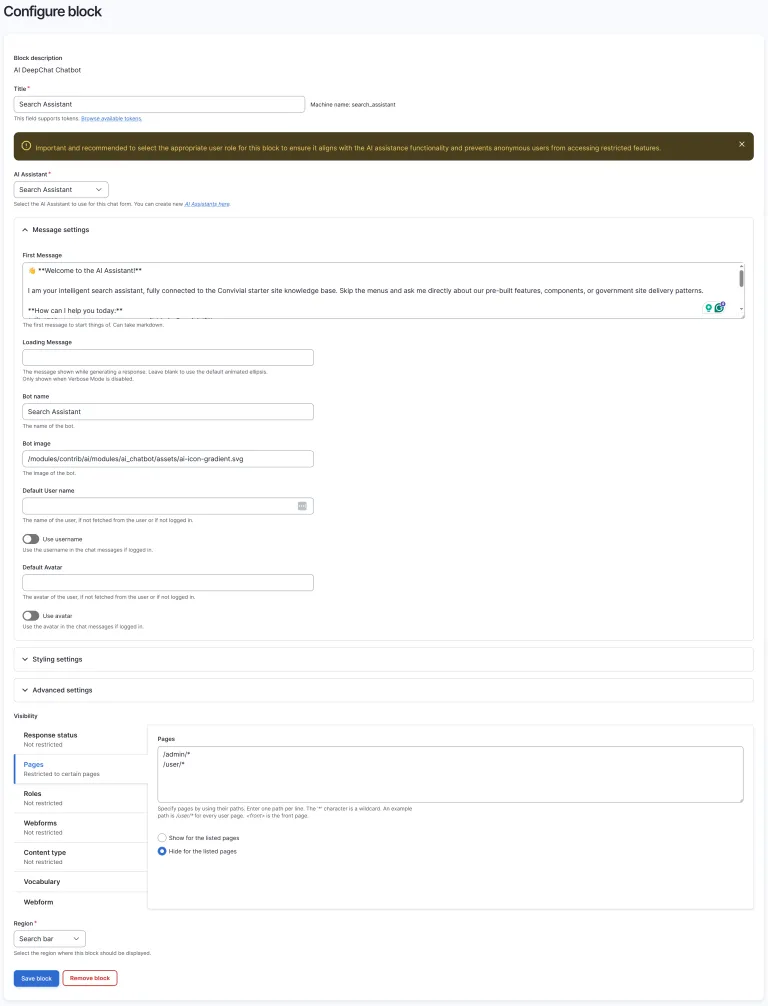
Note the warning in that form: pick the right user role for the block so anonymous visitors cannot reach assistants or actions intended for editors.
How stable are the modules?
The honest answer is: stable enough to ship, moving fast enough to watch. AI Search and AI Assistant API are among the most actively developed parts of the AI module. On the 1.x branch, we can see just recently:
- A chat processor plugin architecture for assistants, backported to 1.x with tests (#3585075, #3585077), which cleans up how the chatbot processes assistant responses.
- Markdown rendering done properly: league/commonmark added as a dependency (#3586595) and a dedicated HTML to Markdown conversion service, so chat output rendering no longer relies on ad hoc string handling.
- An AI reranking processor for Search API (#3586543), improving the ordering of retrieved chunks before they reach the model.
- Batch embeddings as a first-class operation type (#3568648), which speeds up indexing large sites considerably.
- Small robustness wins that matter in production, like checking whether any vector database provider is configured before search setup (#3586517) and clearer exceptions when an assistant's agent ID cannot be resolved (#3586449).
Pin your versions, read the release notes, and budget a little time per upgrade. In exchange, you get a subsystem that improves month by month.
Tips and tricks
Render Markdown with league/commonmark. LLMs speak Markdown, and our assistant prompt leans into that with bold key terms, bullet lists, and link-formatted follow-up questions. Since the module now ships league/commonmark as a dependency, use it to render assistant output into the chat interface rather than writing your own regex-based formatter. It handles streaming-friendly partial rendering, link formatting for the citation section, and it is the same parser the module itself is standardizing on.
Test the RAG tool in isolation. When answers look wrong, the first question is whether retrieval or generation is at fault. The Tools Explorer lets us run the RAG/Vector Search tool directly against the index with a query, a result count, and a minimum score, with no LLM involved:
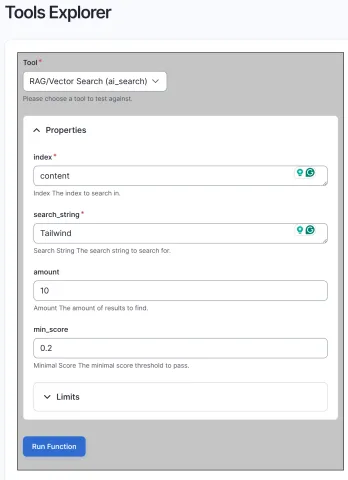
If the right chunks come back here but the chatbot answers poorly, the problem is the prompt. If they do not, the problem is the index.
Inspect the vector database directly. One level deeper, the Vector DB Explorer runs a raw similarity query against the database and can return every chunk per entity rather than just the best one. This is how we verify chunking behaviour and spot content that embedded badly:
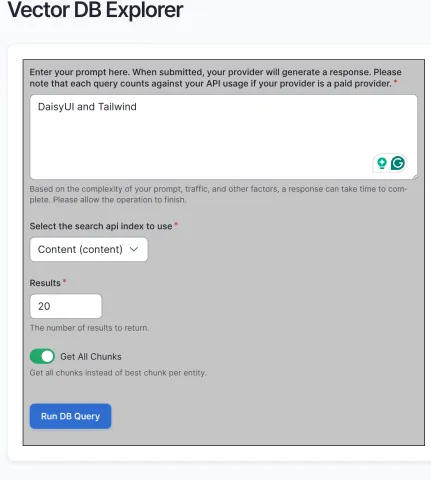
Tune min_score before touching the prompt. A threshold too low pads the context with noise and invites waffle; too high and the assistant finds nothing. We start around 0.2 and adjust based on Tools Explorer results for real queries.
Reindex after display changes. Because we embed the rendered HTML, changes to view modes or field display alter what gets embedded. Queue a full reindex after meaningful display changes or the vectors drift out of sync with the site.
The AI edition and how we use it
On our Convivial for GovCMS AI Edition builds, this entire stack ships preconfigured: the provider wiring, the Content index with sensible field settings, the search assistant with a grounded prompt, and the chatbot block placed and restricted. Importantly, it sits behind the same global guardrails we described in our introduction to Guardrails, so PII checks run on every chat message before it reaches the provider, with no opt-in required from the chatbot itself.
In closing
A semantic search chatbot is a data pipeline as much as a feature. Published content flows out to an embedding model and into a vector database; user questions flow out to a chat model along with retrieved chunks. Before launch, map that flow end to end: what is indexed (published, public content only), where embeddings and chat logs are stored and for how long, and what happens when a user pastes something they should not have. Public data going to an LLM is a reasonable trade. Data users should never have provided is not, which is why the chatbot, the index, and the guardrails need to be designed together, with storage and anonymisation decided up front rather than after the first incident.