

Convivial for GovCMS has recently been improved across the board, with major enhancements making it a best-in-class starter site for GovCMS projects. The updates bring a new theming engine, user configurability, metadata, GEO, and additional components for editors. The updates represent a significant improvement to the platform, paving the way for more structured, visually appealing, and compliant websites for government agencies in Australia.
To see all the updates in action, please visit the Convivial for GovCMS site, check out the demo section, and review the feature list.
Updates
The major changes are covered below.
Modern framework: Tailwind and DaisyUI replace Bootstrap 5
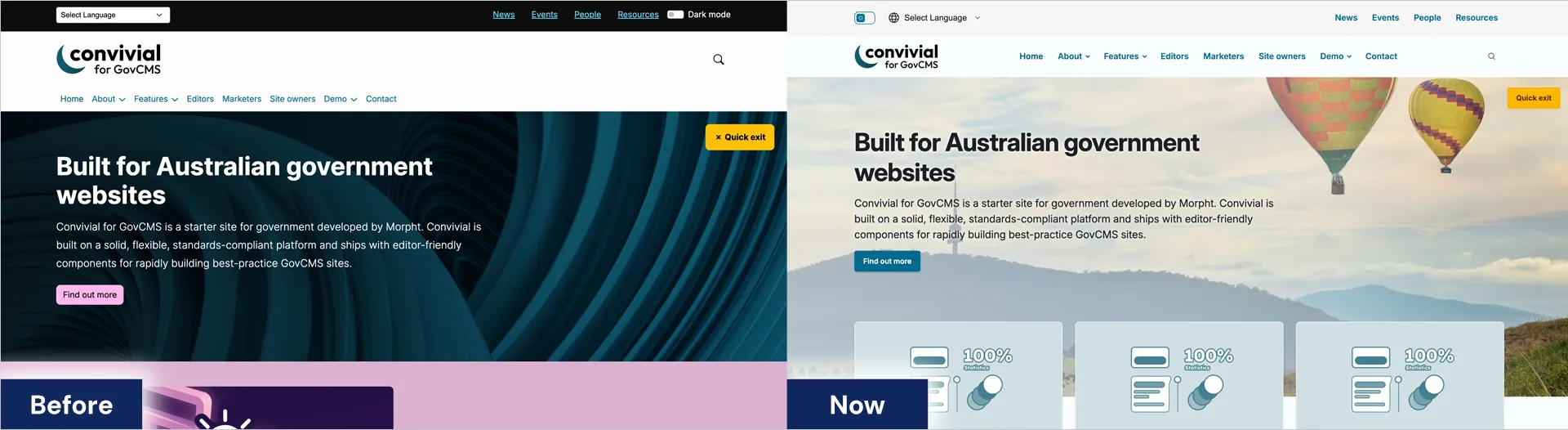
Convivial for GovCMS has been based on Bootstrap for many years, ever since the Australian Government Design System was sunsetted. Bootstrap served its purpose well, providing high and low-level components addressing a wide range of use cases. Bootstrap was the go-to framework for many years and had a large following. Bootstrap did suffer some shortcomings, the main one being its lack of support for CSS Variables, difficulty in overriding components and a tendency to look “bootstrappy” even when customised.
More recently, we have seen the rise of Tailwind as a theming framework. It follows a different conceptual model from Bootstrap, providing a range of utility classes to alter the presentation of elements rather than taking a top-down approach. This provides a lot of flexibility but does suffer from not providing higher level components suitable for ready site building.

DaisyUI has been developed as a framework on top of Tailwind. DaisyUI provides the structure that is missing in Tailwind. For this reason, we made the decision to move from Bootstrap to DaisyUI. We now enjoy a rich set of components, with clearly defined properties and enumerations to allow for enhanced design control. Tailwind provides extra flexibility at a deeper level, allowing for even finer-grained theming control when needed.
All layouts, templates and components have been refactored to be DaisyUI and Tailwind-ready. We have therefore kept to the same core structure of the previous Convivial for GovCMS entities, and enjoy improved structure and flexibility at the same time.
Single Directory Components: Future-proofed components
Single Directory components are a new way of defining components in Drupal. Each component has properties (with options) and slots for other components. The humble twig template has been uplifted with structure, allowing systems such as Canvas and other templates to make use of the SDCs in a modular way. SDCs open up the way for more flexible page building.
Each component in Convivial for GovCMS has been reworked to suit the new SDC paradigm. Formally, they have been defined and captured in the Morphos theme. The components can now be used in a variety of systems as Canvas components or as foundations for Paragraphs. In Convivial for GovCMS, each of our Paragraphs now sits on top of an SDC with a formal definition.
Theme settings: No code theme configuration for fast customisation
Customising the theme is where the rubber hits the road for many site builders and themers. Each site needs a custom look, and the success of a site will often come down to how flexible and adaptable the theme is. Site owners should not need to resort to code to customise the theme.
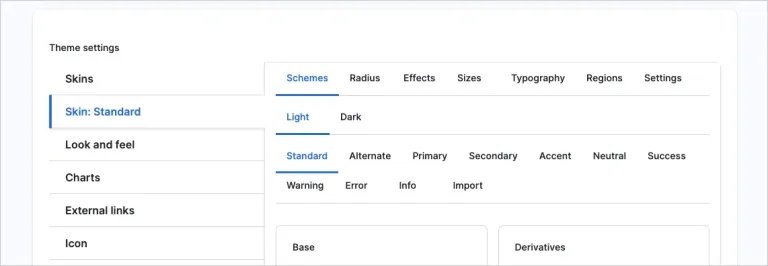
The Convivial for GovCMS theme has a rich interface for defining how the site will work. The theme supports concepts such as:
- Colour scheme: light mode vs dark mode
- Skin: Sets of Colour palettes and settings that can be assigned to different areas of the site
- Colour palettes: Colour definitions that can be assigned to different areas of a page (Standard, Alternate, Primary, Secondary, Accent)
- Settings: Other variables defining how the site looks and works (corners, typography, etc).
This rich set of configurations is exposed as CSS Variables to the CSS, enabling a very adaptable site, giving site builders and editors a lot of freedom, all without the need for custom code.
Updated layouts for better navigation
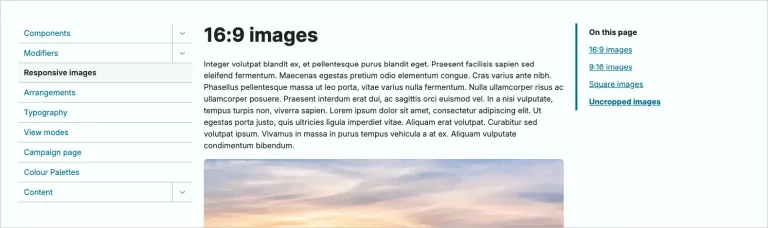
The switch to Tailwind and DaisyUI has led to more screen real estate on desktop browsers. Our normal 8/4 or 3/1/9 grid has now been updated to a 3/6/3. Six grid units provide the right width for readability. This opens up the third column (three units) for the “On this page” widget, providing the user a quick way to navigate the content on the site. The widget has been made sticky to keep it in place as the page scrolls. This is a big win for long-form content and improves the efficiency of users navigating through that content.
Skins: Apply different look and feel across site sections
Skins wrap up a set of colour palettes and config to define a coherent look and feel. Different skins can be assigned to different parts of the site. This makes it possible to selectively style a site section such as a campaign. Skins give your site personality and allow it to be allocated to where that personality is needed most.
Colour palettes and textures: Deep integration of colour options for your brand
Page designs need to be chunked out to delineate content and organise ideas. Colour palettes help organise content into logic unit. Editors can easily add palettes to content sections and then apply textures to them.
The colour palettes drive a set of variables that are then used to customise all of the UI elements in that section. Colour has therefore been integrated at a very deep level and stretches to cover: backgrounds, text, links, textures, overlays, icons, forms, tables, buttons and pretty much anything else you can think of. Each component needs to be “colour palette” aware. Convivial for GovCMS will deliver colour-accessible results for you, no matter what your editors select.
Dark mode: Fully integrated colour switcher
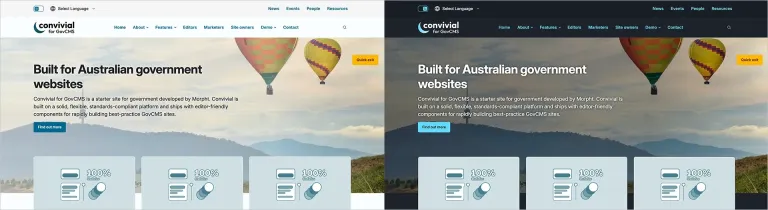
Dark mode is an emergent factor on government sites. Previously, it was rarely seen; however, this is starting to change now that the benefits of dark mode are better understood (accessibility) and user preferences are respected. The Dark mode selector allows the user to select from a new set of dark colour palettes. Just like the light colour palettes, dark mode will be accessible across the standard components of the site.
Overlays: Accessible background images
One of the challenges of allowing for colour palettes and dark mode is that the background may pose a risk to colour contrast. For example, a dark background image will not work for a “light” palette as the text will also be dark, resulting in poor contrast.
Overlays have been introduced to ameliorate this problem. An overlay increases contrast whilst allowing the background to still shine through. Contrast has also been improved by adding a subtle shadow to the text, increasing the contrast further. Naturally, the overlays are colour palette aware and will reflect the background colour that has been assigned to the content.
Webform styling: First-class design for demanding applications
Drupal forms include a wide range of complex elements that extend beyond what is typically found in a framework such as Tailwind or DaisyUI. For example, Webforms can have steps. They can also be nested in fieldsets and sections. Webforms can also have elements arranged in columns with flexbox. Convivial for GovCMS has implemented many of these unusual features to deliver form styling that is best of breed. If you have a complex form, it should display well with Convivial for GovCMS.
Internationalisation: Right-to-Left text
English is read from left to right. Other languages, such as Arabic, are read from right to left. A design system needs to be styled so that content, in all of its variants, displays as expected. It is not just about aligning text a certain way. Many other areas need adjustment as well: embedded images, card images, gradient directions, button placement, etc.
The theme layer has this covered by replacing the concepts of “left” and “right with “start” and “end”. Styling is therefore able to adapt to this worldview depending on the language.
The Google Translate widget at the top of the page has also been extended to amend the text direction of a page when a new language has been selected. For example, if a user switches from English to Arabic, the orientation of the page will change alongside the content being translated on the fly.
Enhanced GEO for AI results
Drupal has always excelled at structured metadata. Exposing this data with Schema.org JSON-LD is a no-brainer, making it easier for bots and crawlers to understand the site content. This is especially the case in a world of AI and a need for Generative Engine Optimisation (GEO). Convivial for GovCMS has this aspect covered with a flexible configuration allowing for the mapping of types and properties.
Standard properties are covered, including: type, name, description, identifier, URL and image. Properties can be further mapped with typical properties, including: about and same as. Advanced properties can be defined if needed.
The result is that all content of the site is backed up with quite extensive metadata, helping bots better understand the site. This should improve your site’s standing with AI search results and decrease the chance of content being remixed incorrectly.
FAQ Pages for questions and answers
One of the most powerful tools in optimising pages for AI is to include Question and Answer pairs for the FAQ Page type. AI loves chunks of content. The Accordion component has been uplifted to support FAQ Page content, allowing pages to be uplifted for AI.
Phosphor icons
Drupal 11 supports icons natively. This allows for an icon library, such as Phosphor, to be added in and used for components such as cards and buttons. We have decided on the Phosphor icon library as the default library for Convivial for GovCMS. This allows for the easy addition of new icons without the need to upload an SVG image.
Flexible menus
The theme configuration supports a number of different options for the menu, allowing the site to adapt to the complexity of the information architecture. The following menu types are supported for the main menu: Simple, Dropdown, and Megamenu.
New components: Diff and Slider
The move to DaisyUI as the theme framework has opened up new opportunities for the delivery of components. We have added a Diff component, which allows for the before and after versions of an image to be compared. We have also added a new Slider component based on the popular SwiperJS library.
Audience visibility switcher: Personalise content for an audience
Government sites often need to serve different content to different audiences. Wouldn't it be nice if the messaging on a page could be adapted to the particular audience? The newly created Audience Visibility Modifier allows content to be shown to only the relevant audience.
The user’s audience can be determined by them explicitly opting into an audience (through a select list or link). Alternatively, a system such as Convivial Profiler can assign an audience based on the use behaviour. Once the audience has been determined, the content can then be personalised.
Search Improvement: Autocomplete
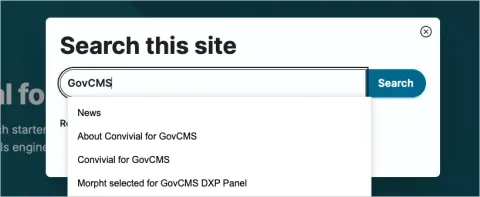
GovCMS SaaS now ships with Search API Autocomplete, allowing for search suggestions to display as the user types in their query. This new feature has been implemented into Convivial GovCMS.
Content quality: Refined content model
Government sites demand quality content, and a CMS should deliver the tools to help editors maintain that quality. Previously, this included rigorous use of dates (updated and published), content moderation and tools for identifying missing content (descriptions and alt text). This list has now been expanded to include:
- Content owners and business units: Identifying who is responsible for content and providing filterable lists to identify content in need of maintenance.
- Review by date: Alerting teams to content that is or soon will be out of date.
These new tools provide a lightweight way for editorial teams to proactively identify what will need to be updated in the future and who is responsible for it.
User dashboard - Quick links for content editors
The User page in Drupal is often an unloved area of the site, providing no useful content and remaining unstyled. Convivial for GovCMS has rectified this by uplifting the experience with the content listings, alerting the user to content that needs attention.
Updated admin theme: Gin
The admin theme has been updated to Gin, which is now becoming the default admin theme for new Drupal builds. Gin offers a fresh design with more of an application feel. This should make content editors feel more at home, as the experience does feel more modern and refined.
Prettier login screen
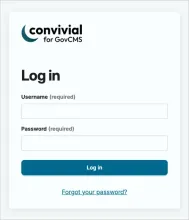
Gin comes with a companion module that updates the login form. Unfortunately, GovCMS SaaS does not ship with this module. Convivial for GovCMS therefore has an updated look and feel for the login screen, providing users with a more friendly authentication experience.
Web vitals
Websites are scored on content, popularity and web vitals - the internal quality metrics that define the accessibility, SEO and best practices of a website. Convivial for GovCMS strives for perfect scores in Accessibility, SEO and Best Practices. Performance scores are generally as good as reasonably practicable, given the constraints of the platform and dynamic content.
The same old goodness from previous versions
The DNA of Convivial for GovCMS has remained essentially unchanged. The above improvements are reworkings or extensions to what was already there:
- Helpful starter content types for most use cases
- Wide range of components for flexible site building
- Focus on accessibility, responsiveness and inclusivity.
- Structure content with cross-cutting concepts and rich relationships.
- Personalisation ready with Convivial Profiler
- Recommendation ready with the Recombee recommender as a service.
- Leveraging all the relevant GovCMS modules to expose functionality where possible.
What it means for GovCMS websites
The latest build of Convivial for GovCMS strives to deliver the absolute best platform for delivering government websites in Australia. The team at Morpht has spent over 3000 hours refining the starter site over the years and through successive generations of design systems. Starting with Convivial for GovCMS provides a huge jump start on teh technical delivery of your project.
The latest round of improvements has been driven by the following factors.
Design choice
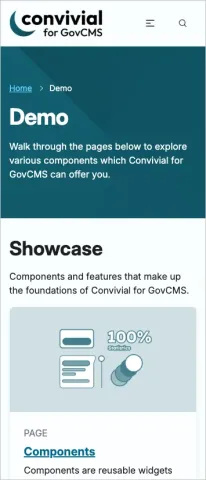
The Australian Government Design System laid down a blueprint for Australian government sites. That blueprint was based on accessible content that was easy to digest, with a strong emphasis on card-based design and complementary colours representing a brand. These core aspects have been carried forward into Convivial for GovCMS. The design language has evolved to keep pace with developments on key sites such as the DTA and Digital Australia. As discussed above, the design system has been further extended to incorporate more components from DaisyUI and Tailwind. The system delivers a solid, conservative design out of the box, suitable for a wide range of departments.
Convivial for GovCMS is not limited to this standard approach. It can be adapted with colour palettes, UI settings, backgrounds, behaviours, textures, overlays and right components in a variety of layouts. It is a flexible foundation for marketing or campaign sites as much as it is for department or minister sites.
AI Ready: Metadata and GEO
AI is a challenge and an opportunity. Departments are threatened by external AI systems missing or misrepresent content as it is remixed into other search results. The antidote to this situation is to tell the AI as much as possible about the content. This can be done through JSON-LD metadata for Schema.org, along with the FAQ format. In this current era, content creators need to take the initiative and ensure that the content they are delivering is fit for purpose to get the best outcomes on external systems.
Future proofed
The move to using DaisyUI/Tailwind and SDCs future proofs Convivial for GovCMS. The system is based on a widely adopted framework that will improve over time. An investment in Convivial for GovCMS should not be threatened by the design system going out of date. Furthermore, the platform is Canvas ready for improved page building, should GovCMS decide to adopt the Canvas ecosystem into the platform.
No code tools
The world is moving to no-code tools, empowering users to build systems for themselves. Convivial for GovCMS takes the approach of exposing as many tools as possible, whilst protecting the integrity of the site.
- Site builders can define the colour palettes and schemes in the theme without writing code. If the colours are not accessible, the site warns them.
- Editors are free to select components, colour and backgrounds to communicate as clearly as possible. However, they are restricted from using colours and structures that are not accessible or responsive.
Freedom and Control
Government sites cover a very wide range of situations, including jurisdiction, purpose, content and the need to adhere to top-down branding. Convivial for GovCMS has been developed to address each of these concerns. It serves as a solid starting point for an individual site or can be developed further as a “white label” start for a department wishing to deliver a consistent experience across sites.
Conclusion
It has been a lot of fun uplifting Convivial for GovCMS this time around. The DaisyUI updates place the platform on a firm footing, opening the way for faster development in the future. We welcome your feedback and are naturally happy to discuss how it could work for you on your next project.