

Personalisation only works when people trust it. If visitors can't see why they're being shown a particular set of links, they have no way to judge whether the suggestion is any good, no way to correct it, and every reason to be suspicious.
That was the thinking behind the Why feature in Convivial Personalisation. Every block of suggested content on a Convivial site now carries a short, always-visible line that says what the suggestion is based on, what topics it covers, and where to go to change or switch it off. Both the Why line and the privacy control centre it links to are released and running on the Convivial for GovCMS demo site.
Privacy is now a national priority
Australian privacy law has moved in the last two years, and automated decision-making is a large part of why. The Robodebt Royal Commission put the cost of opaque automation in front of the whole country. Recommendation 17.1 asked agencies to publish plain-language information about the automated systems they use, on their websites, where people can find it.
The first tranche of Privacy Act reform, the Privacy and Other Legislation Amendment Act 2024, followed. It inserted Australian Privacy Principles 1.7 to 1.9, which take effect on 10 December 2026. From that date, an agency's privacy policy must describe the kinds of decisions it has arranged for a computer program to make, or to do something substantially and directly related to making or using personal information, where the decision could reasonably be expected to significantly affect someone's rights or interests.
The Act never uses the term "automated decision-making" (ADM), but the Office of the Australian Information Commissioner (OAIC) does. Its final guidance, released on 30 September 2026, makes a few things clear. Where you're unsure whether something is in scope, take the cautious approach and include it in the policy. This legislative update is therefore relevant to all federal government sites that are personalising content.
What the regulator asks for
For personalised content, the obligations come from a handful of principles. APP 1 asks for openness about how personal information is handled. APPs 3 and 5 govern collection and the notice you give when collecting, including by inference. APPs 10, 12 and 13 cover quality, access and correction. And APPs 1.7 to 1.9 add the new privacy policy requirement.
Does suggesting a few related pages "significantly affect" anyone's rights? Usually not. The risk case is personalisation that hides or buries an entitlement, such as a grant, a payment or an obligation, because of what the system thinks it knows about you. That's a question for each agency's privacy officer, and we'd expect different answers for a library catalogue and a payments portal. Our position is simpler: design as if the rules apply.
The OAIC has also said what good looks like. Its 2026 review of ADM reporting across 23 agencies found that none had published an ADM policy, and recommended a dedicated ADM webpage, information at multiple reference points (collection notices, the privacy policy, ADM statements), and easy-to-read examples. Its long-standing guidance on privacy policies favours a layered approach, and warns that a policy on its own is not a substitute for a notice at the point where information is handled.
None of that requires a line on the page. All of it points toward one.
Our starting point: the profile never leaves the browser
The most effective privacy control is not collecting the data in the first place. Convivial Personalisation builds its profile in the visitor's browser, from the topic and audience terms tagged on the pages they view. The profile is stored only in the browser. It is never sent to a server, never tied to a login, and never seen by the agency.
Matching happens on the device too. Every piece of content on a Convivial site carries its own topic terms from the content model. When a personalised block renders, the browser compares those terms against the local profile and shows the closest matches. Clear your browser storage and the profile is gone.
This changes the compliance picture considerably. There is no database of visitor interests to secure, no overseas disclosure to worry about and no server-side record that could be requested, breached or misused. The agency still needs to describe the feature in its privacy policy, and we ship suggested wording for that. But the hard part, the personal information itself, stays with the person it belongs to.
Designing Why
We used progressive disclosure: three tiers, each giving a little more than the last, so a visitor in a hurry gets the gist and a visitor with questions gets answers.
- Signal. Personalised content is always labelled, with a heading such as "Suggested for you". It is never mixed, unmarked, with generic content.
- Reason. A short line sits directly under the suggestions and says, in plain words, what they're based on and what they cover.
- Control. A privacy control centre lets the visitor see the profile held in their browser, adjust it or turn personalisation off, and read the relevant section of the privacy policy.
The reason line is the part people will see most, so it got the most argument. Here's the wording we landed on:
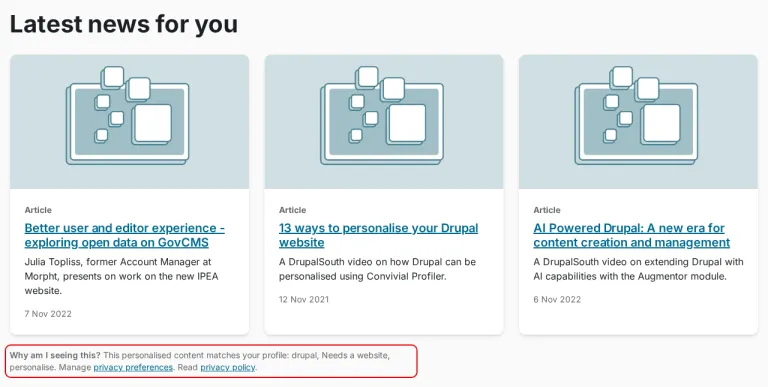
Why am I seeing this? This personalised content matches your profile: {{ reason }}. Manage privacy preferences. Read privacy policy.
A few decisions sit behind those three sentences.
It's always visible. Not a tooltip, not an icon you have to find, not a panel that expands on click. A hover tooltip can't hold links, doesn't work on touch and is easy to miss with a screen reader or at high zoom. A line of text on the page needs no discovery and passes WCAG 2.2 AA without special handling. The label is real text, in bold, so it matches what a screen reader announces.
Two links, always. One to the control centre, one to the personalisation section of the privacy policy. The second is a deep link to the relevant anchor, not the top of a 3,000-word page.
It can't drift. The line is generated from the same data that produced the suggestions. There is no separate explanation to keep in sync, so the explanation is always true.
If there are no suggestions, there is no line. And where the inference would touch on anything sensitive, the answer is to word it more vaguely or not personalise at all.
Ahead of the requirement, by design
Nothing in the Privacy Act requires an on-page explanation of personalised content. The privacy policy update meets APP 1.7 to 1.9. The Why line is good practice, and we built it because of the OAIC's guidance on layered information.
This direction is unlikely to reverse. The Privacy Act Review proposed a right to request meaningful information about how substantially automated decisions are made. It isn't law yet, but a Why line is a sensible head start.
The Why line and the privacy control centre are live on the Convivial for GovCMS demo site. Have a look, try turning suggestions off, and tell us whether the wording makes sense to you. We're still testing it, and the people who run government websites are exactly the audience we want to hear from.