

Recently, I broke my left hand playing basketball. I expected the usual inconveniences: pain, awkward showers, washing my hand (try doing this with your left hand behind your back). Thankfully, I am right-handed, but the impact it had on day-to-day activities was frustrating.
What I didn’t expect was how profoundly it would impact my work as a UX/UI designer.
In a flash, most of my productivity tools disappeared. Every day keyboard shortcuts? Gone.
I suddenly found myself operating in a world with new constraints, and the impact was immediate.
Having worked on Australian Government websites for over 12+ years, I am no stranger to accessibility. This life experience truly highlighted the challenges I already knew about but had not experienced.
As frustrating as it was, this experience also gave me some valuable insights. A deeper, more personal understanding of accessibility and how even minor physical limitations can completely reshape a user’s experience. Granted, my experience was more heavily impacted regarding the software I use: Figma, Illustrator and Photoshop, to name a few. The lessons are the same for websites.
Losing my shortcuts overnight
Like many designers, I rely heavily on keyboard shortcuts to get through each day. Switching tools, zooming in and out, copying and pasting elements, and aligning objects. These interactions add up to huge time savings.
With my left hand taken away, those shortcuts became impossible to use efficiently.
Suddenly I was:
- Moving slowly between tools
- Struggling to find tools in the software's UI
- Awkwardly reaching across the keyboard with my right hand
- Needing more clicks for basic actions
- Feeling mentally fatigued from constantly “working around” my constraints.
It wasn’t just a loss of speed; it was a loss of flow. Basic tasks we do every day were a struggle. For example, copy and paste became a four mouse click process instead of a two keyboard shortcuts.
I design for efficiency and clarity, but here I was fighting my software just to perform basic tasks.
While most websites don’t rely on keyboard shortcuts, this experience highlighted the importance of allowing users to navigate and find information easily, without needing multiple interactions to uncover buried content.
Accessible experiences
Working primarily with Australian Government departments means accessibility isn’t a nice-to-have, it’s a requirement. An area I am very familiar with, and yet, this temporary disability caught me completely off guard.
It was a humbling reminder that accessibility is much broader than screen readers and colour contrast. Other areas include:
- Motor limitations
- Temporary injuries
- Situational constraints
- Cognitive load
Accessibility wasn’t just a known scenario anymore; I was living it.
Rebuilding my workflow with one hand - Finding another way
After the initial shock, I started experimenting with alternative workflows and tools.
Dictation
Dictation helped with emails, documentation, and notes. I found that speaking ideas aloud took some getting used to, but it reduced the strain on my one functioning hand. It also greatly improved my typos and spelling!
Mapping shortcuts to my Wacom remote
My Wacom remote became a lifeline. A wireless controller with 17 customisable buttons and a Touch Ring designed to give users quick access to shortcuts in creative software.
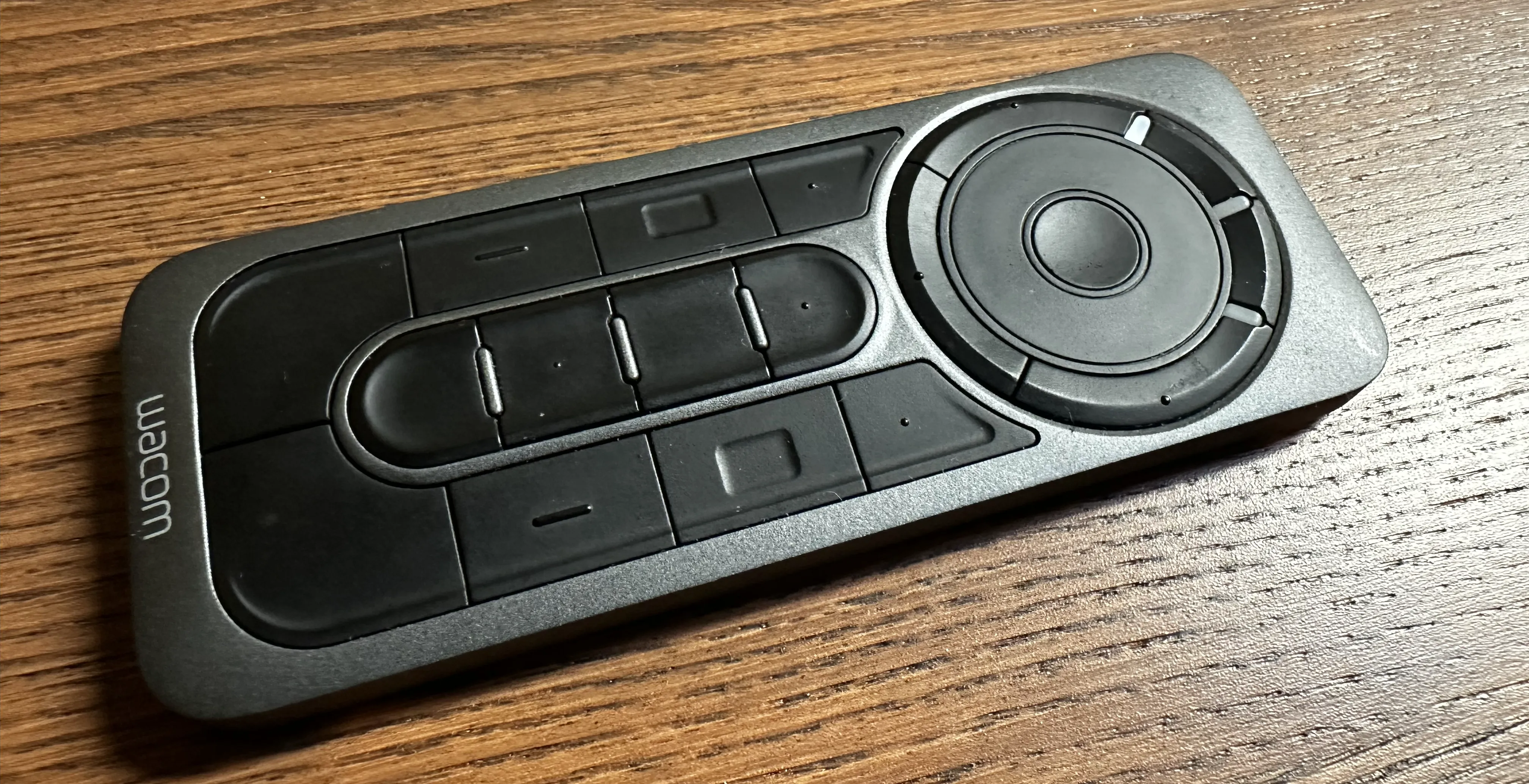
I reassigned frequently used shortcuts such as: zoom, undo, copy and paste to buttons. Tasks that took multiple clicks were back down to one. I should note, it took some time to identify the gaps I was missing and map these shortcuts to improve my productivity.
There should always be multiple ways to do things! Is your website keyboard accessible? How does your site perform using a screen reader?
Accessibility
Accessibility isn’t only for people with permanent disabilities. It’s for all of us, at different stages of our lives, in different circumstances.
We all experience disability at some point:
- A broken bone
- Eye strain
- Illness
- Ageing
- Situational limitations (holding a baby, carrying groceries, commuting with one free hand)
Accessibility provides alternative pathways so that we can continue to function, even when things go wrong. As designers, we often talk about empathy, but nothing builds empathy faster than being forced to experience a limitation first (broken) hand.
Perspective
This short period of injury changed my perspective in lasting ways. I’ve become even more sensitive to:
- How many clicks does something require?
- How precise does the user need to be?
- Can you find the tool or information easily?
- Can this interaction be simplified?
Accessibility isn’t just about meeting WCAG standards; it’s about designing for real humans in varying states of ability.
Practical challenges for you (yes, you)
If you work in UX design or web development, here are a few experiments I encourage you to try:
- Try using your device with one hand for 10 minutes. You’ll immediately discover friction points you’ve never noticed.
- Navigate your own website with only the keyboard. Is it intuitive? Logical? Possible?
- Try a short task using a screen reader. Even a few minutes can shift your understanding of structure and content hierarchy.
- Temporarily disable mouse input. Does the UI still work?
Observe where fatigue sets in
Accessibility isn’t just about whether something can be done, but whether it can be done comfortably, easily and repeatedly.
Conclusion
Breaking my hand was frustrating, slow, and inconvenient. It also gave me a renewed appreciation for accessibility features and considerations, and highlighted the invisible barriers people face every day more than ever before.
Key takeaways:
- Productivity tools like shortcuts are taken for granted
- Accessibility features are not just supportive, they’re transformative
- Designing inclusively benefits everyone, from users to teams and organisations
- Temporary disabilities can create permanent empathy.
This experience reinforced why accessibility is at the heart of good design:
It makes technology work for humans, not the other way around.